Kurahi Business · Department 07 of 15
Procurement
Purchase requests are checked, supplier quotations are compared like for like, and once a person chooses a supplier Kurahi drafts the purchase order in Word and Excel. Ordering stays with people.
What Kurahi does in this department
Agents prepare; people decide. No agent sends, pays or deletes anything on its own.
Purchase request checks
Item, quantity, amount, vendor, budget code and a needed-by date at least five days ahead are required; above JPY 300,000 needs a second approver and above JPY 5,000,000 goes to ringi.
- Inputs
- Requester, item, quantity, amount, vendor, budget code, needed-by
- Kurahi prepares
- Order proposal and, if asked, a vendor email draft; budget code and remaining budget or 【要確認】
- Checks
- Required fields; warn above ¥100,000, second approver above ¥300,000, above ¥5,000,000 to 稟議; needed-by at least 5 days ahead
- Who approves
- Budget holder approves or sends back; second approver above ¥300,000; 購買申請 SLA 72 h
Competitive quotes required
At least two quotes must be attached; a three-quote rule is included for companies that require it.
- Inputs
- Supplier quotations attached to the request
- Checks
- At least two quotes attached (warning); a three-quote rule ships commented out
Supplier quote comparison
Quotes are compared on the tax-exclusive net only when they cover every requested item and quantity; missing items are never treated as free and ties are preserved.
- Inputs
- Requested item codes and quantities; two or more supplier quotes, transcribed or read from sheets under quotes/
- Kurahi prepares
- Priced comparison on tax-exclusive net; lowest complete quotes, with missing items and quantity differences shown
- Checks
- Missing items or quantity differences make a quote incomplete; ties kept; no overall lowest without a complete quote
- Connected systems
- office plugin (office_quote_compare)
- Autonomy
- Never awards, saves or orders; a person decides
Supplier sheets with fingerprint
Supplier quotations saved as CSV or Excel in the project's quotes folder are read and their SHA-256 recorded with the comparison.
- Inputs
- Supplier CSV or .xlsx under quotes/: first visible sheet, saved values only
- Kurahi prepares
- Quote lines with the sheet's SHA-256
- Checks
- Error cells, formulas without saved values, bad numbers or duplicate codes refuse the whole sheet
Supplier selection by a person
A named person records the chosen supplier on the case; choosing other than the lowest complete quote requires a written reason, and a fraud flag blocks the selection.
- Inputs
- The person's chosen supplier; a written reason when not among the lowest complete quotes
- Kurahi prepares
- Selection record: supplier, chooser, comparison digest, lowest quotes at selection time
- Checks
- Order drafts refused when quotes changed since the choice
- Who approves
- A named person from an authenticated session chooses
Purchase order draft
A purchase order draft is written in Word and Excel for the chosen supplier with every amount recomputed by Kurahi; it is never issued or sent.
- Inputs
- Procurement case with a recorded supplier choice
- Kurahi prepares
- 発注書 draft as Word and Excel with recomputed figures, chooser and any deviation reason
- Connected systems
- office plugin (office_po_create)
- Autonomy
- Never issued or sent; a person reviews and issues it
Automatic PO drafts after selection
When enabled, a routine drafts the purchase order as soon as a supplier is selected, never twice from the same selection, and refuses a draft if the selection changed meanwhile.
- Inputs
- supplier.selected on 購買申請, or hourly at :30 on weekdays 9:30–18:30
- Kurahi prepares
- One PO draft per choice in output/purchase-orders/, recorded on the case
- Connected systems
- office plugin enabled for the gateway; Project in 実行 Act mode
- Autonomy
- L1 準備, off until enabled; nothing issued, sent or paid
Procurement evidence record
A worksheet ties the reviewed quote versions, selection, draft file and approval together and keeps a draft distinct from a placed order.
- Inputs
- Supplier source references and versions, comparison files, returned SHA-256, PO draft
- Kurahi prepares
- Evidence ledger: checker and date, selection reason, draft version, approval reference, order confirmation after ordering
- Checks
- Draft checked against the reviewed quote and selection; keep the original hash
- Autonomy
- Does not update the case or clear warnings
No orders before approval
The agent never places an order or contacts a vendor, and drafts may not say 発注済み or order placed.
- Checks
- Do not state the order is placed before approval (発注しました, 発注済み, order placed, 契約しました)
- Who approves
- Budget holder approves; then a person orders and records confirmation
- Autonomy
- Never places an order or contacts a vendor; order email stays a draft
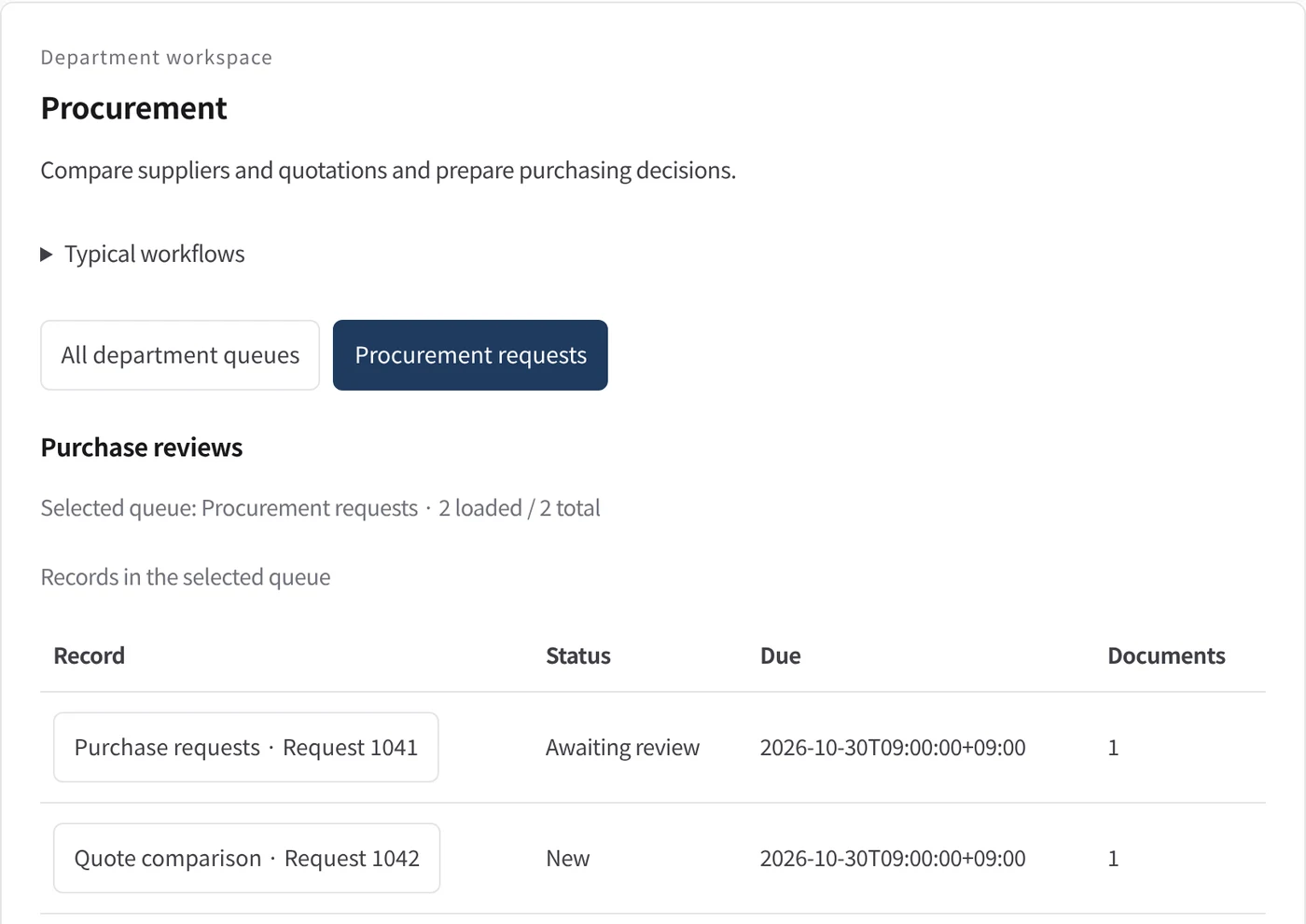
Department workspace: Purchase reviews
Procurement records are shown as a table with status, due date and attached documents.
- Inputs
- Work items in the project queues mapped to this department
- Kurahi prepares
- Read-only table of record, status, due date and documents
Work queues
- Procurement
- Purchase requests
Policy checks
- Required: item, quantity, amount, vendor, budget code, needed-by
- Amount: second approver above 300,000 JPY; above 5,000,000 JPY needs a board approval (稟議)
- At least two quotes attached
- Needed-by date at least 5 days ahead
- Do not state the order is placed before approval
- Requester and description required
- Do not claim external actions were performed
- Document reviews require a source attachment
Autopilot routines
- Purchase order drafts for chosen suppliers
Documents
- Quote comparison worksheet
- Purchase order draft (Word, Excel)
- Procurement evidence record
In every department
- Its own workspace, and an agent conversation that knows the department
- Incoming mail routed into the department's queue
- Approval routes with the required approvers and separation of duties
- Word, Excel and PowerPoint documents
- Signed evidence for every step
- A morning brief of decisions waiting and items escalated
Shared connectors
- kintone
- Gmail
- Box
- LINE WORKS
- Microsoft 365
Commencez par un seul processus.
Parlez-nous du travail que vous souhaitez déléguer. Nous vous montrons Kurahi sur un processus proche du vôtre, puis nous vous aidons à décider jusqu'où aller.
Nous contacter
Un échange sur le travail, les systèmes concernés et qui approuve quoi.
Nous contacterDemander un devis
Personnel numérique, gouvernance des données, déploiement isolé et support avec SLA, par contrat écrit.
Demander un devisCommencer gratuitement
Installez Kurahi sur votre serveur et utilisez les éditions, la file de travail et l'Autopilot en L0 et L1 sans frais.
Commencer gratuitement