Kurahi Business · Department 07 of 15
Procurement
Purchase requests are checked, supplier quotations are compared like for like, and once a person chooses a supplier Kurahi drafts the purchase order in Word and Excel. Ordering stays with people.
What Kurahi does in this department
Agents prepare; people decide. No agent sends, pays or deletes anything on its own.
Purchase request checks
Item, quantity, amount, vendor, budget code and a needed-by date at least five days ahead are required; above JPY 300,000 needs a second approver and above JPY 5,000,000 goes to ringi.
- Inputs
- Requester, item, quantity, amount, vendor, budget code, needed-by
- Kurahi prepares
- Order proposal and, if asked, a vendor email draft; budget code and remaining budget or 【要確認】
- Checks
- Required fields; warn above ¥100,000, second approver above ¥300,000, above ¥5,000,000 to 稟議; needed-by at least 5 days ahead
- Who approves
- Budget holder approves or sends back; second approver above ¥300,000; 購買申請 SLA 72 h
Competitive quotes required
At least two quotes must be attached; a three-quote rule is included for companies that require it.
- Inputs
- Supplier quotations attached to the request
- Checks
- At least two quotes attached (warning); a three-quote rule ships commented out
Supplier quote comparison
Quotes are compared on the tax-exclusive net only when they cover every requested item and quantity; missing items are never treated as free and ties are preserved.
- Inputs
- Requested item codes and quantities; two or more supplier quotes, transcribed or read from sheets under quotes/
- Kurahi prepares
- Priced comparison on tax-exclusive net; lowest complete quotes, with missing items and quantity differences shown
- Checks
- Missing items or quantity differences make a quote incomplete; ties kept; no overall lowest without a complete quote
- Connected systems
- office plugin (office_quote_compare)
- Autonomy
- Never awards, saves or orders; a person decides
Supplier sheets with fingerprint
Supplier quotations saved as CSV or Excel in the project's quotes folder are read and their SHA-256 recorded with the comparison.
- Inputs
- Supplier CSV or .xlsx under quotes/: first visible sheet, saved values only
- Kurahi prepares
- Quote lines with the sheet's SHA-256
- Checks
- Error cells, formulas without saved values, bad numbers or duplicate codes refuse the whole sheet
Supplier selection by a person
A named person records the chosen supplier on the case; choosing other than the lowest complete quote requires a written reason, and a fraud flag blocks the selection.
- Inputs
- The person's chosen supplier; a written reason when not among the lowest complete quotes
- Kurahi prepares
- Selection record: supplier, chooser, comparison digest, lowest quotes at selection time
- Checks
- Order drafts refused when quotes changed since the choice
- Who approves
- A named person from an authenticated session chooses
Purchase order draft
A purchase order draft is written in Word and Excel for the chosen supplier with every amount recomputed by Kurahi; it is never issued or sent.
- Inputs
- Procurement case with a recorded supplier choice
- Kurahi prepares
- 発注書 draft as Word and Excel with recomputed figures, chooser and any deviation reason
- Connected systems
- office plugin (office_po_create)
- Autonomy
- Never issued or sent; a person reviews and issues it
Automatic PO drafts after selection
When enabled, a routine drafts the purchase order as soon as a supplier is selected, never twice from the same selection, and refuses a draft if the selection changed meanwhile.
- Inputs
- supplier.selected on 購買申請, or hourly at :30 on weekdays 9:30–18:30
- Kurahi prepares
- One PO draft per choice in output/purchase-orders/, recorded on the case
- Connected systems
- office plugin enabled for the gateway; Project in 実行 Act mode
- Autonomy
- L1 準備, off until enabled; nothing issued, sent or paid
Procurement evidence record
A worksheet ties the reviewed quote versions, selection, draft file and approval together and keeps a draft distinct from a placed order.
- Inputs
- Supplier source references and versions, comparison files, returned SHA-256, PO draft
- Kurahi prepares
- Evidence ledger: checker and date, selection reason, draft version, approval reference, order confirmation after ordering
- Checks
- Draft checked against the reviewed quote and selection; keep the original hash
- Autonomy
- Does not update the case or clear warnings
No orders before approval
The agent never places an order or contacts a vendor, and drafts may not say 発注済み or order placed.
- Checks
- Do not state the order is placed before approval (発注しました, 発注済み, order placed, 契約しました)
- Who approves
- Budget holder approves; then a person orders and records confirmation
- Autonomy
- Never places an order or contacts a vendor; order email stays a draft
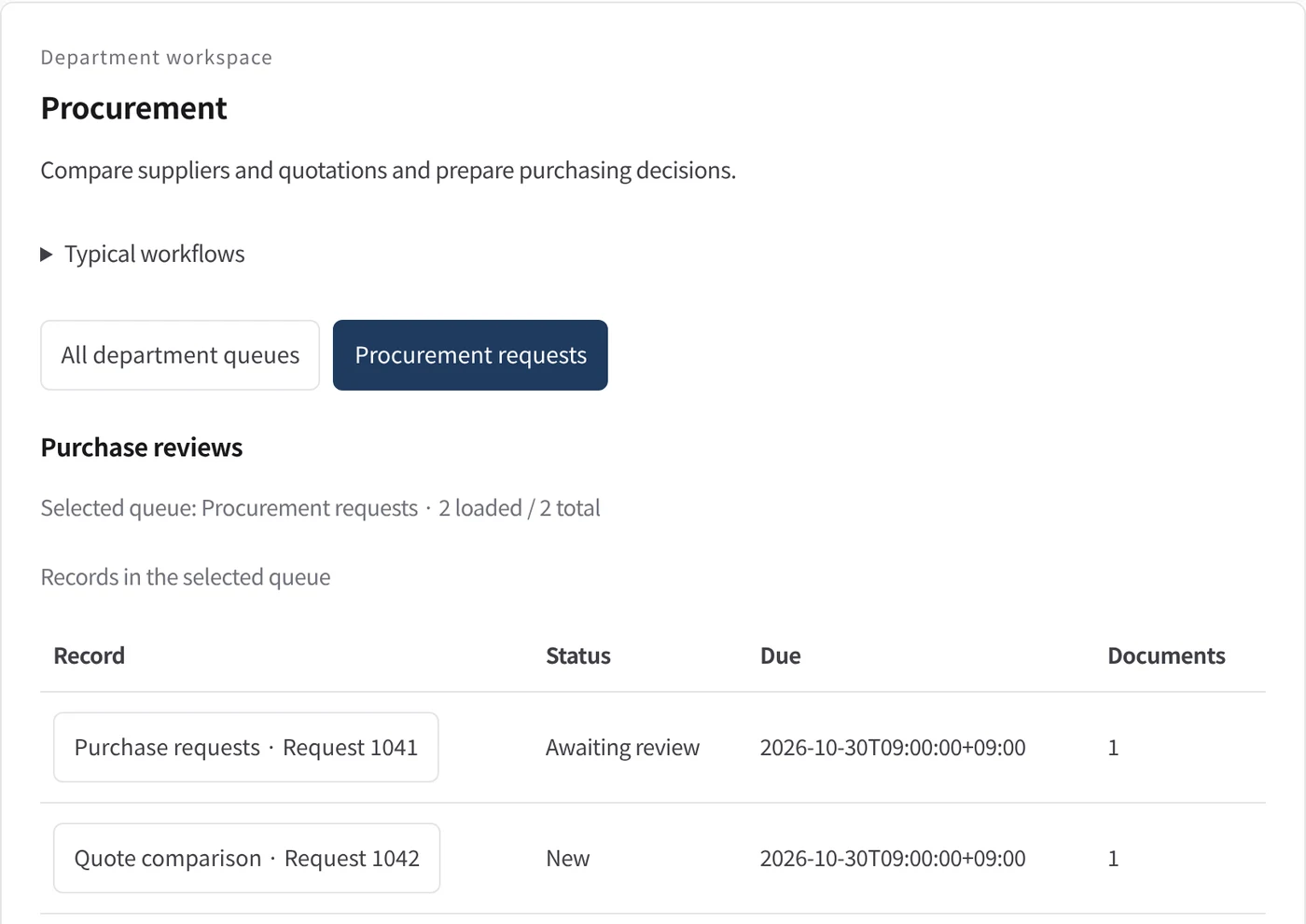
Department workspace: Purchase reviews
Procurement records are shown as a table with status, due date and attached documents.
- Inputs
- Work items in the project queues mapped to this department
- Kurahi prepares
- Read-only table of record, status, due date and documents
Work queues
- Procurement
- Purchase requests
Policy checks
- Required: item, quantity, amount, vendor, budget code, needed-by
- Amount: second approver above 300,000 JPY; above 5,000,000 JPY needs a board approval (稟議)
- At least two quotes attached
- Needed-by date at least 5 days ahead
- Do not state the order is placed before approval
- Requester and description required
- Do not claim external actions were performed
- Document reviews require a source attachment
Autopilot routines
- Purchase order drafts for chosen suppliers
Documents
- Quote comparison worksheet
- Purchase order draft (Word, Excel)
- Procurement evidence record
In every department
- Its own workspace, and an agent conversation that knows the department
- Incoming mail routed into the department's queue
- Approval routes with the required approvers and separation of duties
- Word, Excel and PowerPoint documents
- Signed evidence for every step
- A morning brief of decisions waiting and items escalated
Shared connectors
- kintone
- Gmail
- Box
- LINE WORKS
- Microsoft 365
Empiece con un solo flujo de trabajo.
Cuéntenos qué trabajo quiere delegar. Le mostramos Kurahi en un proceso como el suyo y le ayudamos a decidir hasta dónde llegar.
Contactar
Una conversación sobre el trabajo, los sistemas implicados y quién aprueba qué.
ContactarSolicitar presupuesto
Personal digital, gobernanza de datos, despliegue aislado y soporte con SLA, mediante contrato escrito.
Solicitar presupuestoEmpezar gratis
Instale Kurahi en su servidor y use las ediciones, la cola de trabajo y Autopilot en L0 y L1 sin coste.
Empezar gratis