Kurahi Business · Department 06 of 15
IT & Security
IT service requests and equipment/device requests are received and reviewed, with budget approval for larger purchases. Kurahi never grants access or changes credentials.
What Kurahi does in this department
Agents prepare; people decide. No agent sends, pays or deletes anything on its own.
Equipment and IT device requests
Requests record item, quantity, estimated cost, budget code and business reason; above JPY 50,000 warns and above JPY 500,000 is outside the queue.
- Inputs
- Item, quantity, estimated cost, budget code, business reason
- Checks
- 備品・IT機器の必須項目; warn above ¥50,000, above ¥500,000 outside this pack; needed-by at least 2 calendar days ahead
- Who approves
- IT reviewer (48 h); budget approver above ¥100,000
Equipment approval route
The equipment reviewer checks each request, and a budget approver is added above JPY 100,000.
- Checks
- Above ¥500,000 blocks normal approval; override needs an authorized recorded reason
- Who approves
- 備品・IT機器担当者 (it-reviewer, 48 h, returns to requester); 予算承認 above ¥100,000 (budget-approver, 48 h)
Directory lookup (Microsoft Entra ID)
When enabled, agents can look up users and groups in Entra ID read-only, for example to prepare an access review.
- Connected systems
- Microsoft Entra ID: OpenID Connect sign-in validation; optional read-only directory lookup of users and groups; disabled by default
- Autonomy
- No writes: the directory is never changed
No access or secret changes
Changing secrets or access is on the never-list, and request drafts may not say access was granted.
- Checks
- Do not claim approval or fulfillment before it happens (e.g. access granted)
- Autonomy
- secrets.change never happens autonomously, at any level
IT service work queue
Requests, cases and documents for this department are kept in one queue; the secretariat inbox routine files incoming mail here when the email belongs to it service.
- Inputs
- Requests, cases and documents; emails filed here by the secretariat inbox routine when they belong to this department
- Kurahi prepares
- Case with title, category, priority, flags, short summary and next step; reply draft for clean routine mail
- Checks
- Requester and description required; do not claim external actions were performed; document reviews require a source attachment
- Connected systems
- Microsoft 365 mail (read) and Outlook drafts (write.mailDraft); nothing sent
- Autonomy
- L1 準備 via secretariat-inbox-full; no sending, payments, bookings or account changes; flagged mail gets no reply
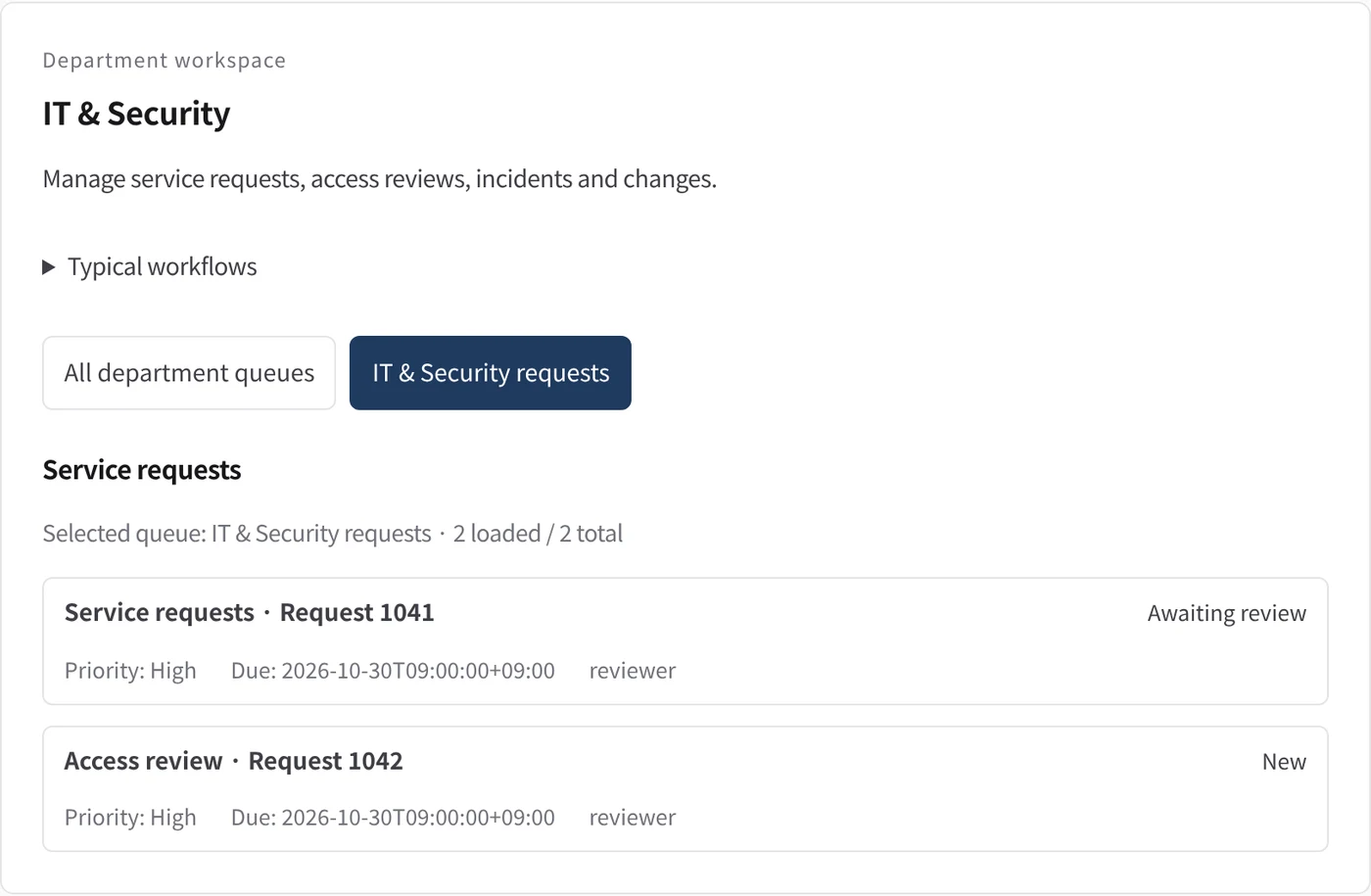
Department workspace: Service requests
IT requests are listed with priority, due date and owner.
- Inputs
- Work items in the project queues mapped to this department
- Kurahi prepares
- Read-only list of records with status, priority, due date and owner
Work queues
- IT service
- Equipment and IT devices
Policy checks
- Equipment and IT devices required fields
- Warn above JPY 50,000; above JPY 500,000 outside this pack
- Requester, department, description and needed-by date required
- Do not claim approval or fulfillment before it happens
- Requester and description required
- Do not claim external actions were performed
- Document reviews require a source attachment
Approval routes
- Equipment and IT devices approval: reviewer → budget approval above JPY 100,000
Documents
- Equipment and IT device request form
Connected systems
- Microsoft Entra ID
In every department
- Its own workspace, and an agent conversation that knows the department
- Incoming mail routed into the department's queue
- Approval routes with the required approvers and separation of duties
- Word, Excel and PowerPoint documents
- Signed evidence for every step
- A morning brief of decisions waiting and items escalated
Shared connectors
- kintone
- Gmail
- Box
- LINE WORKS
- Microsoft 365
Bắt đầu từ một quy trình.
Hãy cho chúng tôi biết công việc bạn muốn giao. Chúng tôi sẽ trình diễn Kurahi trên một quy trình giống của bạn và giúp bạn quyết định nên đi xa đến đâu.
Liên hệ
Trao đổi về công việc, các hệ thống liên quan và ai phê duyệt việc gì.
Liên hệYêu cầu báo giá
Nhân sự số, quản trị dữ liệu, triển khai cách ly và hỗ trợ theo SLA, theo thỏa thuận bằng văn bản.
Yêu cầu báo giáBắt đầu miễn phí
Cài Kurahi trên máy chủ của bạn và dùng miễn phí các phiên bản, hàng đợi công việc và Autopilot ở mức L0 và L1.
Bắt đầu miễn phí