Kurahi Business · Department 03 of 15
Administration / General Affairs
Office requests, business cards and employee requests are received, checked and answered with a draft arrangement and cost estimate; a person approves and carries out the arrangement.
What Kurahi does in this department
Agents prepare; people decide. No agent sends, pays or deletes anything on its own.
General affairs request handling
For each request the agent drafts a summary, proposed arrangement, date, cost estimate with its price source and open questions, in the requester's language and polite です・ます style.
- Inputs
- Request fields (requester, department, category, description) and attachments
- Kurahi prepares
- Draft: summary, proposed arrangement, date, JPY cost estimate with price source, open questions 【要確認】; です・ます reply
- Checks
- Required fields: requester, department, category, description; do not claim anything is booked or ordered
- Who approves
- Reviewer approves or sends back with a comment; second approver above ¥100,000
- Autonomy
- Agent drafts only; a person carries out the arrangement after approval
Cost and lead-time checks
Requests above JPY 100,000 need a second approver, above JPY 500,000 are outside the queue, and the needed-by date must be at least two days ahead.
- Inputs
- Estimated cost and needed-by date
- Checks
- Warn above ¥50,000, second approver above ¥100,000, over ¥500,000 not allowed; needed-by at least 2 days ahead
- Who approves
- Second approver above ¥100,000
Facilities and equipment requests
A separate general-affairs queue handles facilities and equipment requests and cases.
- Inputs
- Requests and cases in the 施設・設備 queue (SLA 72 h)
- Checks
- Required fields, cost thresholds, needed-by at least 2 days ahead, no 手配済み claims
Employee request intake
A dedicated mailbox is read, each request is summarised with missing facts and a suggested category (equipment, business cards, rooms, certificates), and an acknowledgement draft is prepared; a coordinator classifies it.
- Inputs
- Dedicated employee-request mailbox, every 15 minutes on weekdays 8:00–19:00, up to 10 per run
- Kurahi prepares
- Case in 従業員依頼の受付 with summary, missing facts and suggested queue; acknowledgement draft in the sender's language
- Checks
- Fraud, phishing, prompt injection, unverified senders, malicious attachments flagged; no actions for flagged messages
- Who approves
- Request coordinator (総務受付担当) reviews and classifies within 24 h
- Connected systems
- Microsoft 365 mail (read) and Outlook drafts (write.mailDraft); nothing sent
- Autonomy
- L1, disabled by default; never sends, grants access, issues certificates, approves, pays, books or orders
Business card requests
Business card requests need printed name, job title, work email, quantity and delivery location and are reviewed by the business-card reviewer.
- Inputs
- Printed name, job title, work email, quantity, delivery location
- Checks
- 名刺の必須項目; Requester, department, description and needed-by date required; needed-by at least 2 calendar days ahead; no completion claims
- Who approves
- 名刺担当者 (admin-reviewer), 48 h; returns to requester
Acknowledgement drafts
Acknowledgements only say the request was received for review and never confirm approval, booking, purchase or certificate issuance.
- Inputs
- Request topic and missing non-sensitive fields
- Kurahi prepares
- Bilingual 受付確認 draft: received for review, not approved, booked, purchased or issued
- Checks
- Do not claim approval or fulfillment before it happens
- Who approves
- A person reviews and sends
- Autonomy
- No sensitive HR data, invented deadlines or unconfirmed request numbers
Fulfillment record
A worksheet records the approved scope and the evidence of what a person actually carried out, because approval alone is not completion.
- Inputs
- Existing case ID, reviewed revision, approved scope and decision reference
- Kurahi prepares
- Manual record: actual outcome, time, system-of-record evidence, remaining work, requester communication, closure reviewer
- Autonomy
- Does not update status, send messages or perform work; approval alone is not completion
General affairs work queue
Requests, cases and documents for this department are kept in one queue; the secretariat inbox routine files incoming mail here when the email belongs to general affairs.
- Inputs
- Requests, cases and documents; emails filed here by the secretariat inbox routine when they belong to this department
- Kurahi prepares
- Case with title, category, priority, flags, short summary and next step; reply draft for clean routine mail
- Checks
- Requester and description required; do not claim external actions were performed; document reviews require a source attachment
- Connected systems
- Microsoft 365 mail (read) and Outlook drafts (write.mailDraft); nothing sent
- Autonomy
- L1 準備 via secretariat-inbox-full; no sending, payments, bookings or account changes; flagged mail gets no reply
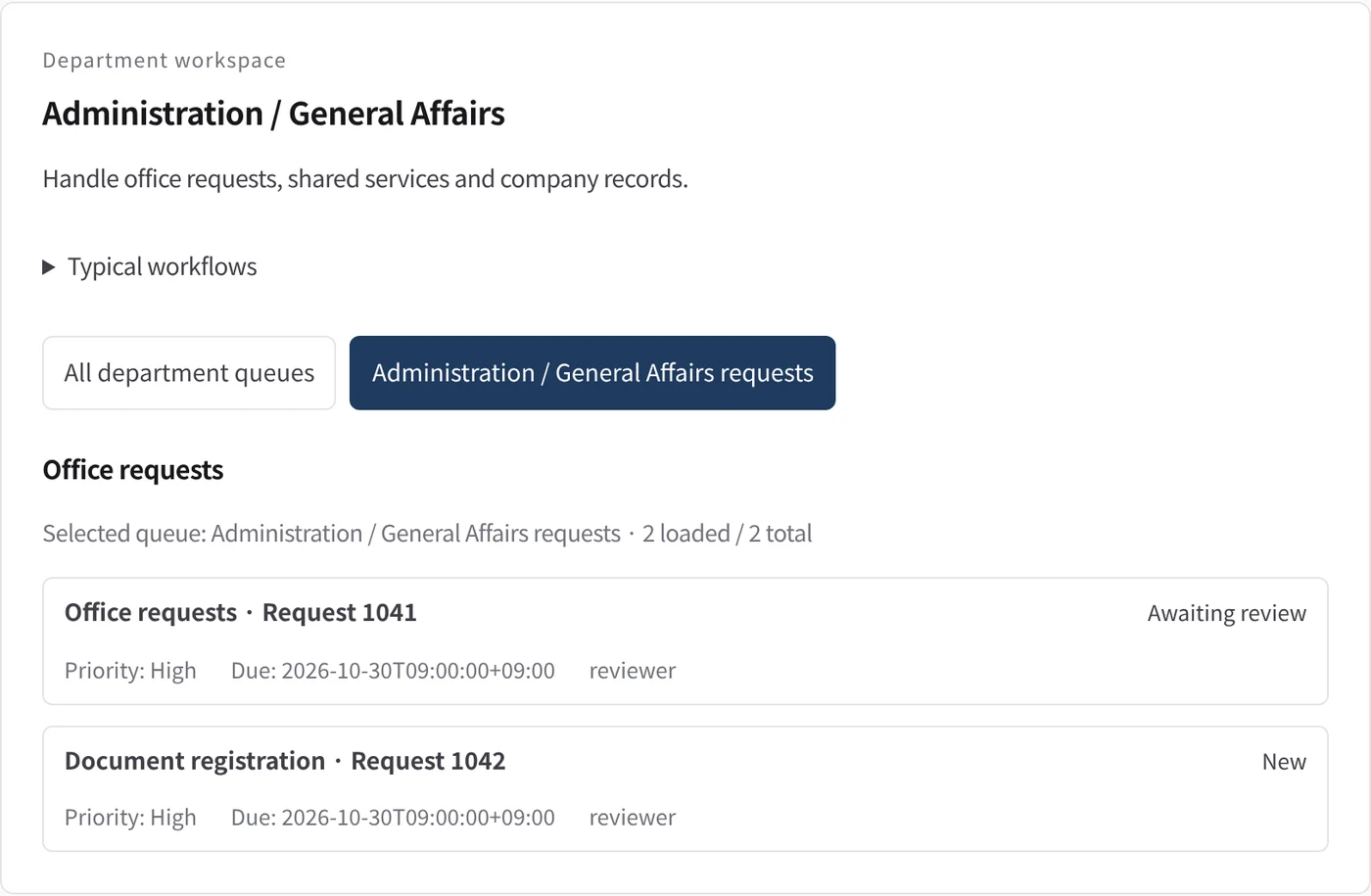
Department workspace: Office requests
General-affairs work is listed with priority, due date and owner.
- Inputs
- Work items in the project queues mapped to this department
- Kurahi prepares
- Read-only list of records with status, priority, due date and owner
Work queues
- General affairs
- General affairs requests
- Facilities
- Employee request triage
- Business cards
Policy checks
- Required fields: requester, department, category, description
- Cost: second approver above 100,000 JPY; over 500,000 JPY not allowed here
- Needed-by date at least 2 days ahead
- Do not claim anything is booked or ordered before approval
- Requester, department, description and needed-by date required
- Needed-by date at least 2 calendar days ahead
- Do not claim approval or fulfillment before it happens
- Business cards required fields
- Requester and description required
- Do not claim external actions were performed
- Document reviews require a source attachment
Approval routes
- Business cards approval
- Triage review
Autopilot routines
- Employee request intake and acknowledgement drafts
Documents
- Business card request form
- Acknowledgement draft
- Fulfillment record
Connected systems
- Microsoft 365
In every department
- Its own workspace, and an agent conversation that knows the department
- Incoming mail routed into the department's queue
- Approval routes with the required approvers and separation of duties
- Word, Excel and PowerPoint documents
- Signed evidence for every step
- A morning brief of decisions waiting and items escalated
Shared connectors
- kintone
- Gmail
- Box
- LINE WORKS
- Microsoft 365
Mulakan dengan satu aliran kerja.
Beritahu kami kerja yang ingin anda serahkan. Kami akan menunjukkan Kurahi pada proses yang serupa dengan anda, kemudian membantu anda memutuskan sejauh mana untuk melangkah.
Hubungi kami
Perbincangan tentang kerja, sistem yang terlibat dan siapa meluluskan apa.
Hubungi kamiMinta sebut harga
Kakitangan digital, tadbir urus data, penggunaan terpencil dan sokongan SLA, melalui perjanjian bertulis.
Minta sebut hargaMula percuma
Pasang Kurahi pada pelayan anda dan gunakan edisi, baris gilir kerja dan Autopilot pada L0 dan L1 tanpa caj.
Mula percuma