Kurahi Business
Your back office, on autopilot, with every approval on record.
Kurahi Business turns back-office work into queues of work items. Agents prepare the case, the document and the draft reply; your people approve, send back or cancel with a written reason, and every step is recorded with signed evidence.
What adopting it involves
Comes ready
- 15 department workspaces and work queues
- 稟議 approval routes with delegation and escalation
- Email intake with fraud, phishing and attachment flags
- Starter routines: inbox triage with reply drafts, invoice intake
- Word, Excel and PowerPoint documents
Needs configuration
- The mailboxes and systems to connect
- Departments, teams and roles from your identity provider
- Approval routes and amount thresholds
- Each routine's autonomy level
Who sets it up
- Your IT administrator installs Kurahi and connects sign-in and systems
- A business owner in each department defines the queues, routes and thresholds
- KODA SōKEN can do the setup with you under an Enterprise agreement
What employees learn
- Reviewing a prepared case and its sources
- Approving, sending back or cancelling with a reason
- Handling a flagged exception
Scoped separately
- Connections to systems without a Kurahi connector
- Document formats and business rules specific to your company
- Workflows beyond the starter routines
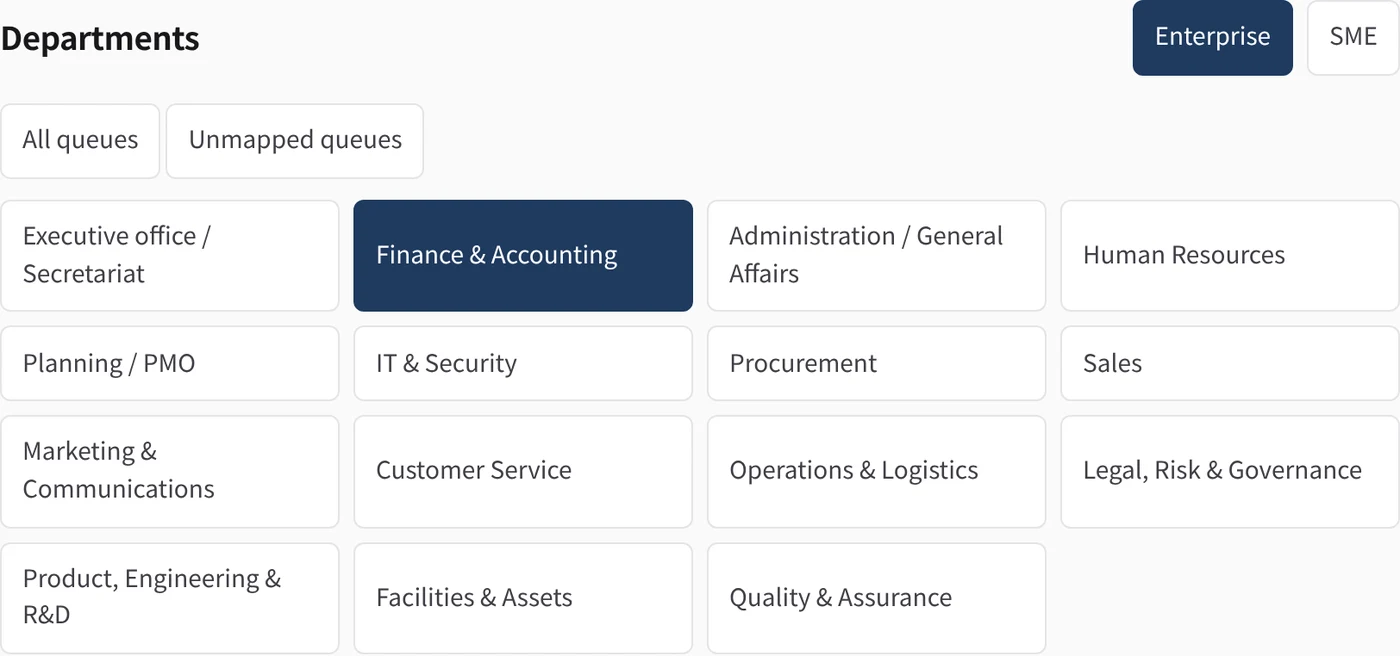
The 15 departments
For each department: what Kurahi does, and how many queues, checks, approval routes, routines and connected systems it brings. Open a department for the detail.
| Department | What Kurahi does | Functions | Queues | Checks | Routes | Routines | Connected |
|---|---|---|---|---|---|---|---|
| 01 Executive office / Secretariat | Inbox cases, reply drafts and documents · Morning brief · Inbox triage and reply drafts | 7 | 1 | 3 | 0 | 3 | Microsoft 365 |
| 02 Finance & Accounting | Expense claim review · Received invoice check · Calculation and rounding check | 12 | 4 | 11 | 1 | 1 | freee 会計, マネーフォワード クラウド請求書, Microsoft 365 |
| 03 Administration / General Affairs | General affairs request handling · Cost and lead-time checks · Facilities and equipment requests | 9 | 5 | 11 | 2 | 1 | Microsoft 365 |
| 04 Human Resources | Leave request check · Overtime check against limits · Overtime thresholds | 12 | 6 | 14 | 5 | 0 | SmartHR |
| 05 Planning / PMO | Workload snapshot · Metric definitions · Exception follow-up | 7 | 1 | 3 | 0 | 0 | — |
| 06 IT & Security | Equipment and IT device requests · Equipment approval route · Directory lookup (Microsoft Entra ID) | 6 | 2 | 7 | 1 | 0 | Microsoft Entra ID |
| 07 Procurement | Purchase request checks · Competitive quotes required · Supplier quote comparison | 10 | 2 | 8 | 0 | 1 | — |
| 08 Sales | Quotation from the price list · Invoice-system tax calculation · Unpriced items and provisional estimates | 11 | 2 | 10 | 1 | 1 | Microsoft 365, マネーフォワード クラウド請求書 |
| 09 Marketing & Communications | Marketing work queue · Department workspace: Campaign work | 2 | 1 | 3 | 0 | 0 | — |
| 10 Customer Service | Customer service work queue · Department workspace: Customer cases | 2 | 1 | 3 | 0 | 0 | — |
| 11 Operations & Logistics | Operations & logistics work queue · Department workspace: Delivery work | 2 | 1 | 3 | 0 | 0 | — |
| 12 Legal, Risk & Governance | Contract register · Contract review requests · Renewal and notice deadlines | 9 | 6 | 14 | 5 | 0 | — |
| 13 Product, Engineering & R&D | Product & development work queue · Department workspace: Development work | 2 | 1 | 3 | 0 | 0 | — |
| 14 Facilities & Assets | Room and facility requests · Facilities reviewer approval · Facilities work queue | 4 | 2 | 6 | 1 | 0 | — |
| 15 Quality & Assurance | Quality work queue · Department workspace: Corrective actions | 2 | 1 | 3 | 0 | 0 | — |
Functional packs (Project templates)
Ready-made templates with the queues, forms, checks, approval routes and guidance for one area of work. Create a Project from one and start working.
Company operations — all departments
One project with 15 departmental work queues for enterprise or SME operations. Agents prepare drafts and people review decisions. Configure access before adding confidential records.
business-company-operations
Contracts and obligations
Contract register, review requests, renewal and notice dates, obligations and human signature handoff.
business-contracts-obligations
Employee requests
Forms and reviewer routes for equipment, business cards, facilities and certificates. Mail intake prepares a triage item and acknowledgement draft.
business-employee-requests
Expense and invoice review
Take expense claims and received invoices in a queue; the agent matches receipts and invoices against the claim and drafts the review, and accounting approves.
business-finance-expense-invoice
General affairs requests
Take facilities, supplies, business cards and company-car requests in a queue; the agent drafts the reply or arrangement and a person approves it.
business-general-affairs
HR leave and overtime
Take leave and overtime requests in a queue; the agent checks them against the overtime limits and month-end forecast and drafts the confirmation, and a manager approves.
business-hr-leave-overtime
Management oversight
Prepare manual workload, exception and measured-outcome reports from authorized statistics and evidence. No automatic aggregation, distribution or downstream actions.
business-management-oversight
People operations
Leave/overtime review from supplied attendance sources and manual onboarding/offboarding checklists. No payroll or access changes.
business-people-operations
Purchase requests
Take purchase requests in a queue; the agent compares quotes and drafts the order proposal, and the budget holder approves. A person places the order after approval.
business-procurement
Sales quotations
Quotation requests by mail become cases with a 見積書 in Word and Excel. Prices come from the price list, tax and totals are computed by Kurahi, and a person sends the quotation.
business-sales-quotation
稟議 approval routes, as your company runs them
A route is an ordered list of stages. Each stage names its approvers by role, by name or by department, with minimum approvals, due times, delegation and escalation. The route is fixed on the item when it is submitted, so later policy edits never move an item already in review.
- People approve, send back or cancel with a written reason, and see the exact draft they decide on
- Escalation to the next role after a set time; delegation when a stage allows it
- The evidence of every decision can be verified
Email intake that knows when to stop
A message becomes a work item by reference, never by copying its body. Risky items are put in front of a person with the reason.
Suspected fraud
A proposed change of bank details flags the item; it cannot be approved or completed until a person clears the flag with a written reason.
Phishing and unverified senders
Flagged items get no automatic action at all. They wait for a person.
Malicious attachments
Attachments are quarantined and scanned before anything is stored. A refused attachment flags its message.
One item per message
A retried run never files a second item or drafts a second reply for the same message.
Connectors for Microsoft 365 and Japanese SaaS
Every connector is off by default and read-only by default. Each write is a separate opt-in that waits for a person's approval, and tokens live in Kurahi's secret store.
Connector documentation- Microsoft 365
- Mail, calendar, OneDrive and SharePoint files; draft-only replies with attachments
- Gmail
- Microsoft Entra ID
- Sign-in, users and groups
- kintone
- Records of listed apps, allow-listed fields
- freee 会計
- Companies, deals, partners, account items, receipts
- マネーフォワード クラウド請求書
- Billings, quotes, partners
- SmartHR
- Employees (work fields only) and departments, read-only
- LINE WORKS
- Channels and members; bot text messages as an approved opt-in
- Box
- Search, metadata and scanned fetch into the Project
Documents and the morning brief
Word, Excel and PowerPoint
Agents write Office files, with editable charts, into the Project. A routine can attach the document to the draft reply of the same case.
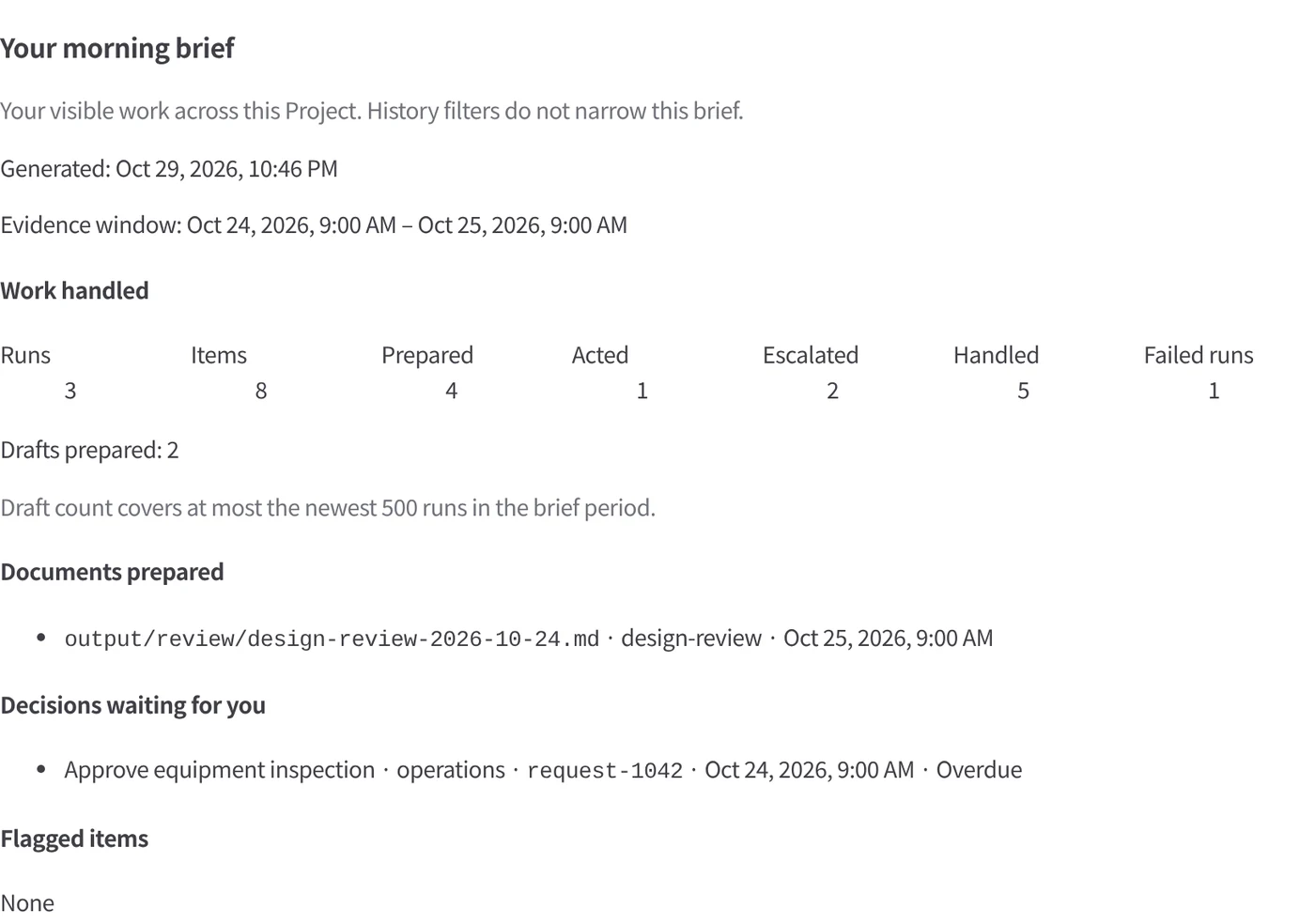
A morning brief for each person
What was handled, which documents were written and what waits for you: built from recorded data only, with no model involved.
Autopilot for the back office
Routines triage the inbox, take in invoices and prepare replies at the level you set. Payments, bank details, contracts, decisions about people and flagged items always go to a person.
How adoption works
Start small and expand on evidence. How much you hand over is always your decision.
- 01
Try it free
Install Kurahi on your own server and run one functional pack with sample data. There is no charge.
- 02
One department live
Start the first department at L0 (observe) or L1 (prepare). People make every decision; time per case and corrections are measured.
- 03
Expand
Extend to the next departments. Autonomy is raised only from 30 days of evidence and only when an authorised person approves it.
In the product
The back office, as your teams will see it
Real screens from the Kurahi Business console, shown with sample data.
Fifteen departments, one platform
Each department has its own workspace, queues and vocabulary, from Finance and Procurement to HR, Legal and Sales — on the same rules and evidence.
Every case in its queue
Invoices, purchase requests, expense claims and quotations arrive as cases with their status, due dates and documents.
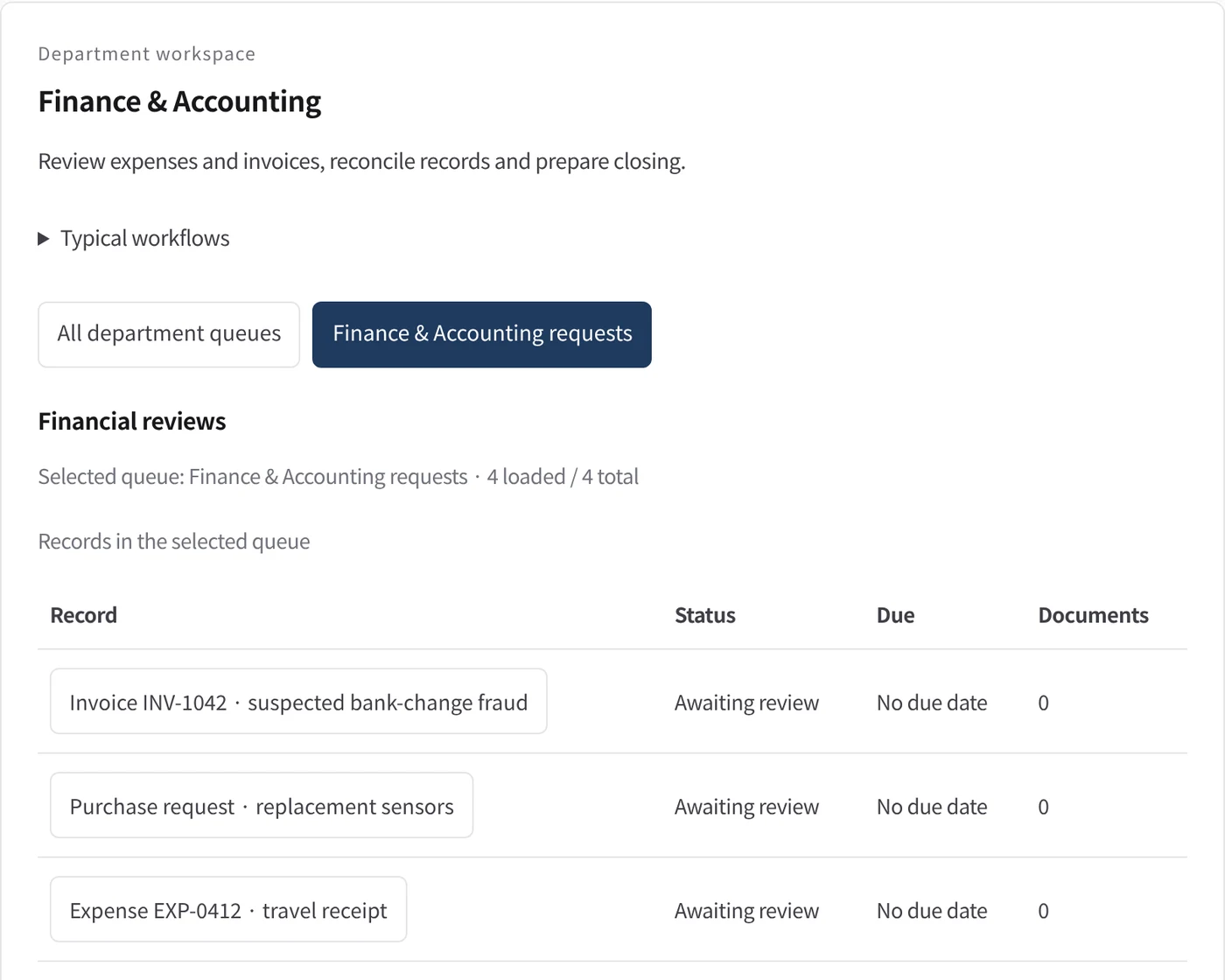
Policy checks that stop what must stop
A request to change bank details is flagged as suspected fraud and blocks approval until a person has verified it with the supplier.

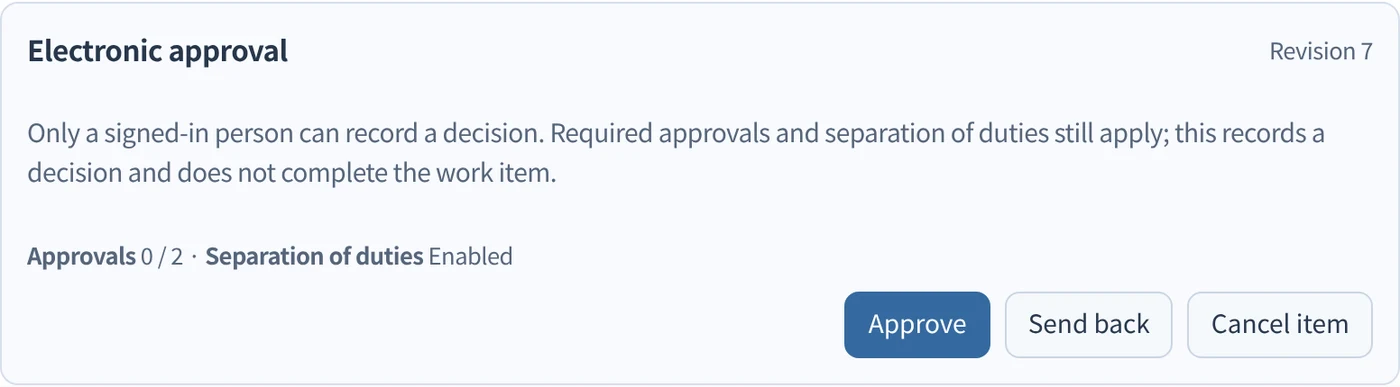
Decisions only people make
Approval routes with the required number of approvers and separation of duties; approve, send back or cancel, each recorded.
A morning brief of what happened
What Autopilot prepared overnight, what was escalated and which decisions wait for you — from the signed records, not from memory.
Mulakan dengan satu aliran kerja.
Beritahu kami kerja yang ingin anda serahkan. Kami akan menunjukkan Kurahi pada proses yang serupa dengan anda, kemudian membantu anda memutuskan sejauh mana untuk melangkah.
Hubungi kami
Perbincangan tentang kerja, sistem yang terlibat dan siapa meluluskan apa.
Hubungi kamiMinta sebut harga
Kakitangan digital, tadbir urus data, penggunaan terpencil dan sokongan SLA, melalui perjanjian bertulis.
Minta sebut hargaMula percuma
Pasang Kurahi pada pelayan anda dan gunakan edisi, baris gilir kerja dan Autopilot pada L0 dan L1 tanpa caj.
Mula percuma