Autopilot
Choose how much to hand over.
Autopilot carries the repetitive work of a team end to end, in every edition. The model never holds a tool that can send, pay or delete: it reads what the engine gathered and proposes, and the engine executes only what the routine's autonomy level allows. Everything else goes to a person as a work item.
Four autonomy levels
Each routine has one level, set in its file by your administrator. That level is the maximum.
| Level | Name | What the autopilot may do alone |
|---|---|---|
| L0 | Observe | Read, classify, report. No actions. |
| L1 | Prepare | Work items, reply drafts, attachments to drafts, documents, uploads to the app folder, meeting time proposals. |
| L2 | Act internally | Reversible internal actions: file, route, assign, update internal records. |
| L3 | Act externally within policy | External actions such as sending mail, only under a valid standing approval that covers every recipient, the template and the daily maximum. |
Never autonomous, at any level
In every edition these are prepared as far as possible, and a person decides in one click.
- Payments
Payment execution is never done by a routine.
- Bank-detail changes
A proposed change also flags the item as suspected fraud.
- Contracts and signatures
Prepared for review, never signed.
- Decisions about people
Legal or HR decisions about a person.
- Secret or access changes
Credentials and permissions stay with people.
- Deleting data
Nothing is deleted by a routine.
- Anything flagged
Fraud, phishing, prompt injection or a malicious attachment: no action at all.
L3 runs only under a standing approval
- Named recipients and domains, or named targets such as a repository
- A template, required for sending mail
- A daily maximum and an expiry at most 90 days ahead
- A written reason; only a person creates or revokes one, and every use is audited
How a run works
Real-time triggers (new mail, work item changes, deadlines, files) sit next to schedules, with rate caps and a loop guard.
Which model does what
Kurahi uses models in different places. This is where each one runs and what it receives.
| Part of Kurahi | Models | What the model receives | Status |
|---|---|---|---|
| Agent sessions (chat and work console) | Hosted, self-hosted or local models; IBM watsonx.ai | The conversation and the tools the agent is allowed | Available |
| Autopilot routines that reason | A command-line backend with no tools: Codex CLI or Claude CLI | Gathered content as marked data, in an empty folder with no session | Available |
| Autopilot checks and the morning brief | None: the engine builds the plan | Nothing | Available |
| Industrial analysis and 設計書 | None: deterministic analysers | Nothing; the same sources give the same document | Available |
Routines that reason send their gathered content only to the model service behind the backend you configure. Checks, the morning brief and Industrial analysis send nothing to a model.
Earned autonomy, never assumed
Proposals from the record
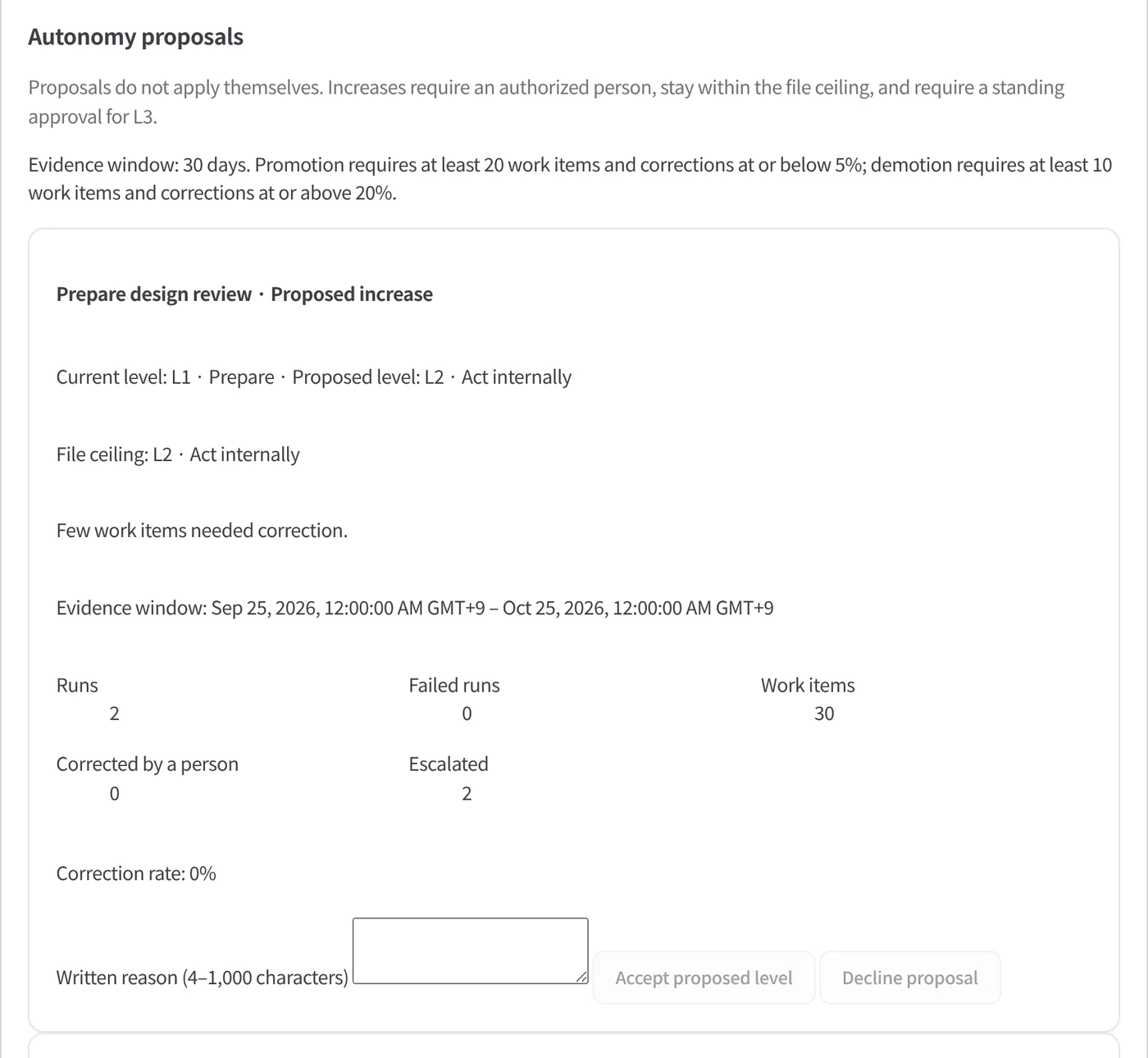
The engine reads 30 days of evidence and proposes one step: up when at most 5% of at least 20 work items were corrected and no run failed; down when 20% or more of at least 10 were corrected.
Only a person accepts
A proposal is a recommendation for review, not a certificate. A person checks how much of the work was actually reviewed and whether it covers the new scope, then accepts or declines with a written reason. The routine file's level stays the maximum.
Automatic demotion
The level drops one step at once when the watchdog trips or a person reports a serious error on an item the routine created.
Watchdog and emergency stop
Behaviour watchdog
Every run is measured before any action executes, against the routine's own baseline. A run outside its pattern executes nothing, the routine is paused, and only a person resumes it with a written reason.
Stop every routine
One switch pauses every routine of every Project and blocks new runs until a person lifts it.
Emergency STOP file
While the STOP file exists on the server, no routine runs, even when the API cannot be reached.
Signed evidence for every run
Each run writes a bundle with a hash-chained event log and a signed manifest: what was read, what the model proposed, every decision and the approval it ran under. Mail bodies and addresses are never stored in it. Each bundle names the previous run, chaining the routine's history, and anyone can verify it offline.
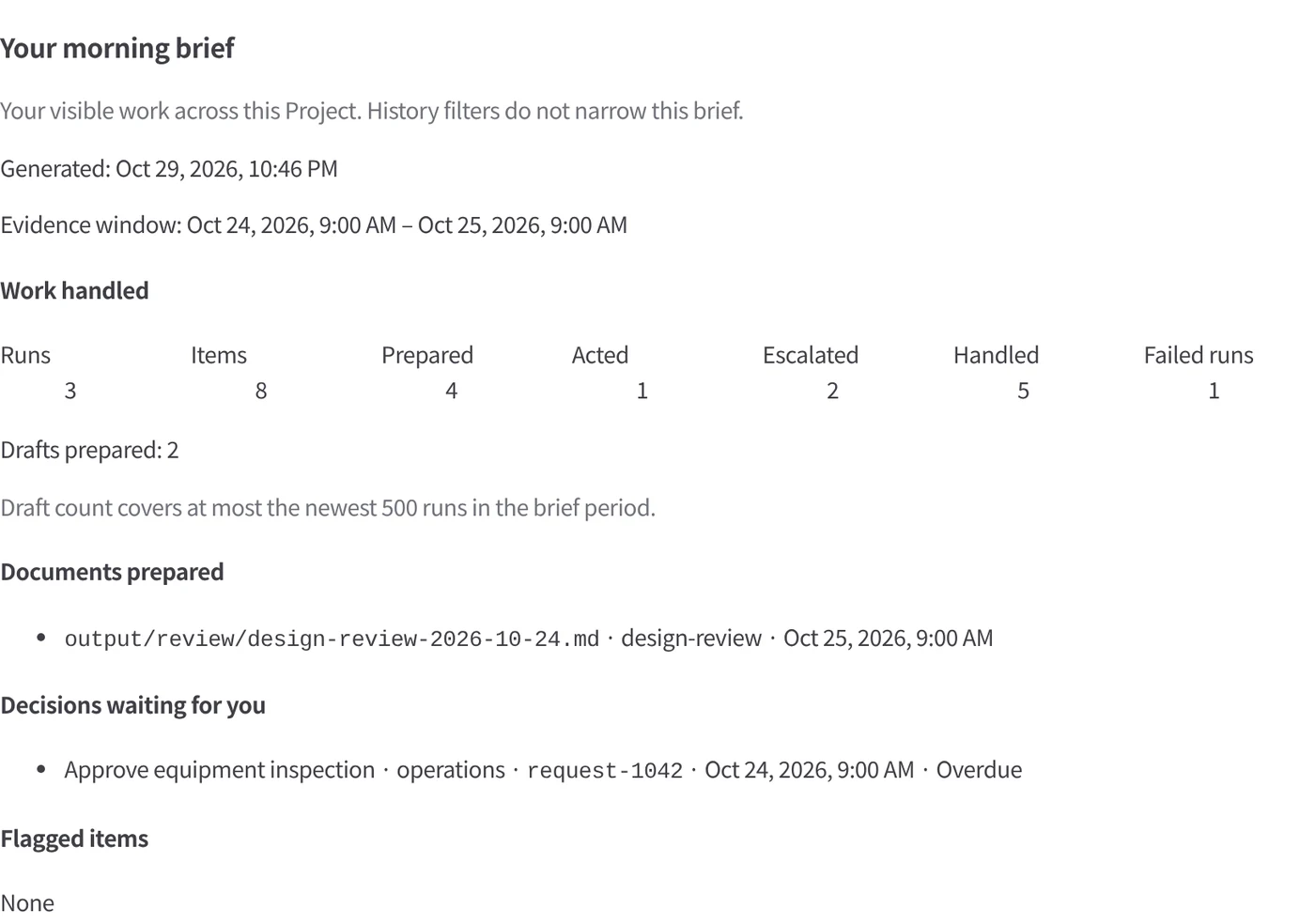
A morning brief per person, built from recorded data only, shows what was handled and what waits for them.
Autopilot documentationIn the product
Autonomy you can see and control
Real screens from the Kurahi Autopilot console, shown with sample data.
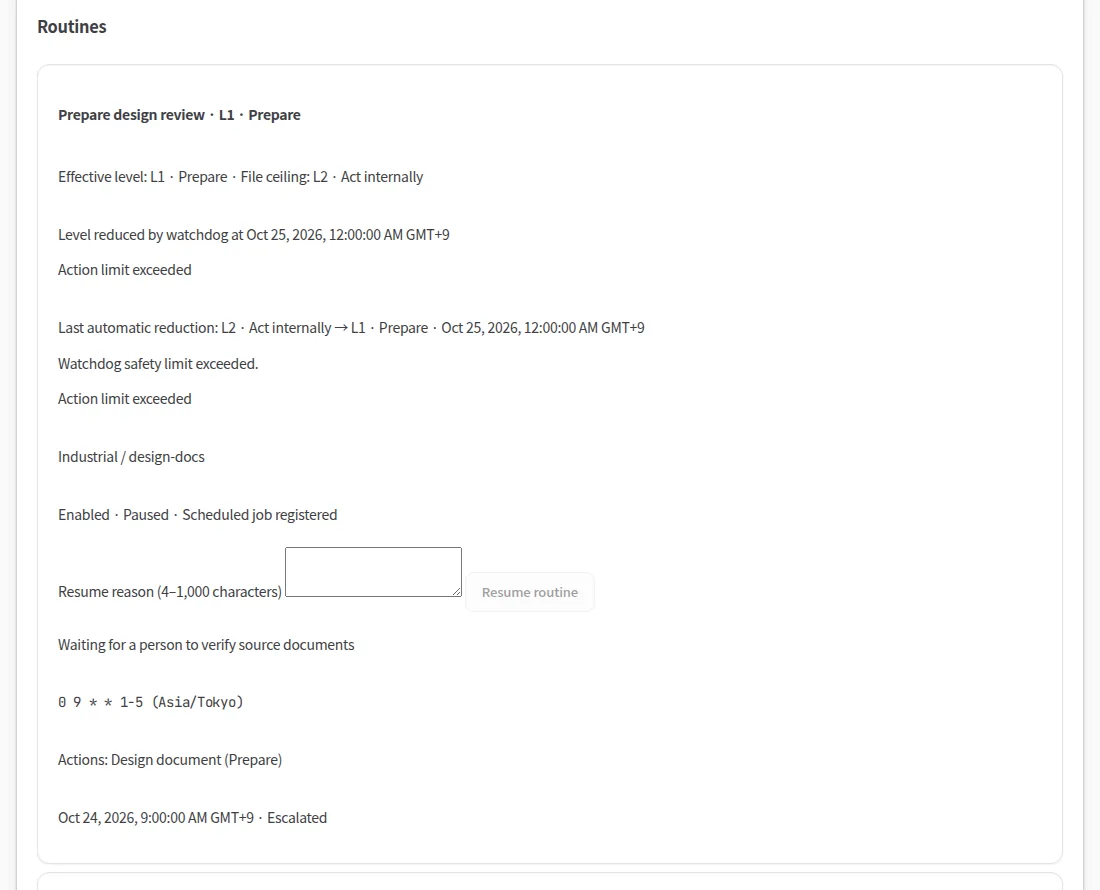
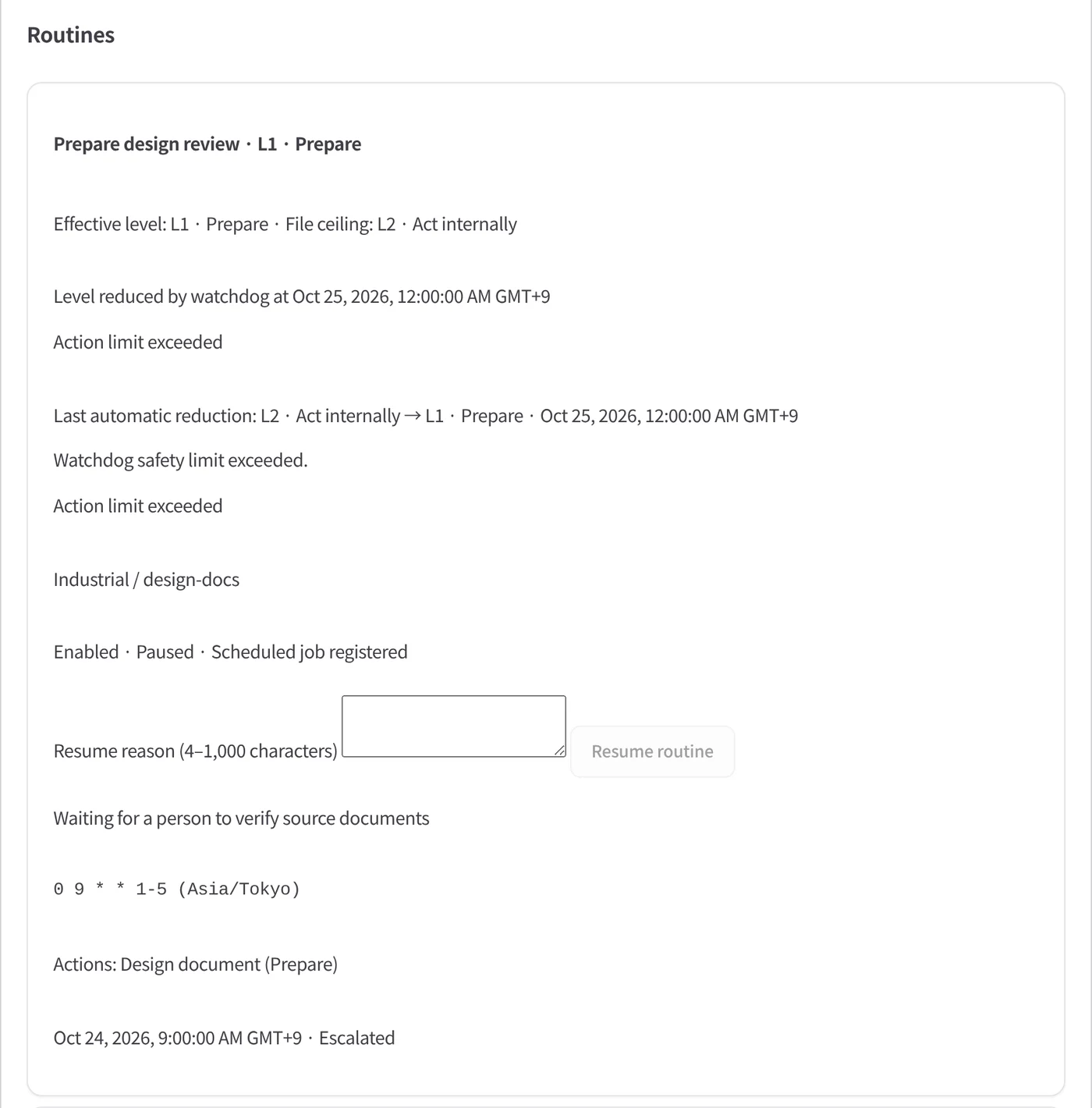
A watchdog that lowers the level
When a routine exceeds its safety limits, the watchdog lowers its autonomy and pauses it. It resumes only when a person gives a written reason.
Autonomy is earned, never assumed
A higher level is proposed only from 30 days of evidence — runs, corrections, escalations. A person accepts or declines, with a written reason, never above the file's ceiling.
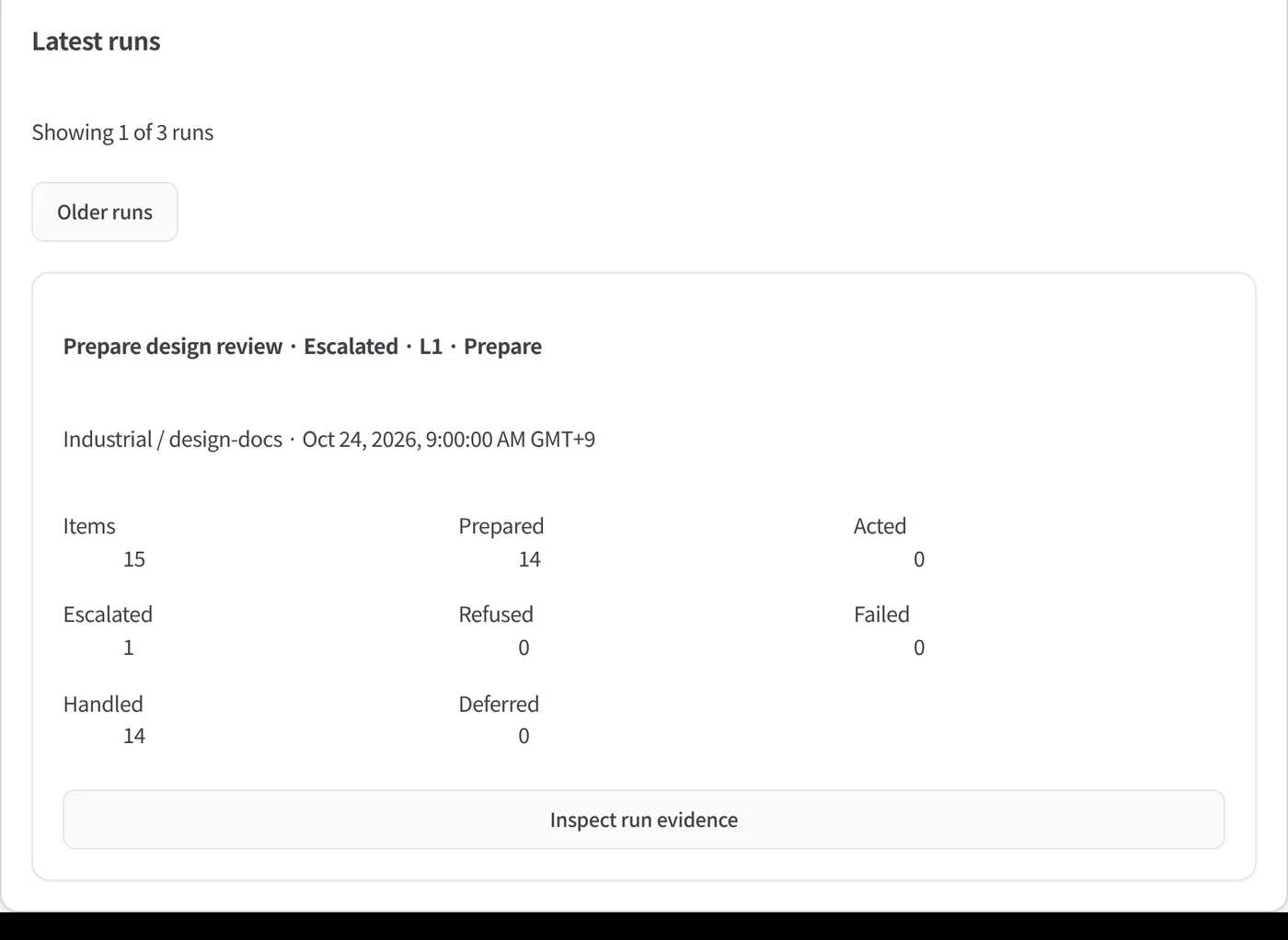
Every run on the record
Items prepared, escalated, refused and handled for each run, with its signed evidence one click away.
A morning brief of what happened
What was prepared overnight, what was escalated and which decisions wait for you — built from the signed records.
Empiece con un solo flujo de trabajo.
Cuéntenos qué trabajo quiere delegar. Le mostramos Kurahi en un proceso como el suyo y le ayudamos a decidir hasta dónde llegar.
Contactar
Una conversación sobre el trabajo, los sistemas implicados y quién aprueba qué.
ContactarSolicitar presupuesto
Personal digital, gobernanza de datos, despliegue aislado y soporte con SLA, mediante contrato escrito.
Solicitar presupuestoEmpezar gratis
Instale Kurahi en su servidor y use las ediciones, la cola de trabajo y Autopilot en L0 y L1 sin coste.
Empezar gratis