Kurahi Business · Department 02 of 15
Finance & Accounting
Expense claims and received invoices are checked against receipts and qualified-invoice requirements, spending requests follow a staged ringi route, and suspected payment fraud is held for a person. Kurahi never pays.
What Kurahi does in this department
Agents prepare; people decide. No agent sends, pays or deletes anything on its own.
Expense claim review
Claim fields are compared with the receipt (date, payee, amount, tax), the category with the purpose and the policy limits, and a review table of matches and mismatches is drafted.
- Inputs
- Expense claim (employee id, amount, expense date, category, purpose) with the receipt
- Kurahi prepares
- Review table claim vs receipt; matched items, mismatches, missing items, recommendation (approve or send back)
- Checks
- Required fields; second approver above ¥50,000, over ¥300,000 not allowed; expense date not in future; receipt attached
- Who approves
- A person decides; second approver above ¥50,000; 経費精算 queue SLA 72 h
- Autonomy
- Never states anything is paid; payment happens in the accounting system after approval
Received invoice check
Vendor, invoice number, registration number (T + 13 digits), amount and tax are checked against the purchase order and the qualified-invoice items.
- Inputs
- Invoice: vendor, invoice number, registration number (T + 13 digits), amount, tax amount, due date; the purchase order
- Kurahi prepares
- Review draft against the purchase order: matches, mismatches, missing items, recommendation
- Checks
- Qualified invoice items (registration number, tax amount…); invoice attached; above ¥1,000,000 needs a second approver
- Who approves
- A person decides; second approver above ¥1,000,000; 受領請求書 queue SLA 120 h
Calculation and rounding check
Every calculation is shown (tax-exclusive + consumption tax = tax-inclusive), rounding differences are flagged and claim/receipt differences are listed under 【要確認】 with both values.
- Inputs
- Amounts, dates and registration numbers exactly as on the document
- Kurahi prepares
- Every calculation shown (税抜 + 消費税 = 税込); rounding differences flagged; mismatches under 【要確認】 with both values
- Who approves
- Expense above ¥50,000 or invoice above ¥1,000,000 needs a second approver
- Autonomy
- Never states anything is paid or will be paid
Spending approval (ringi) route
Spending requests go to the department manager, then finance review from JPY 100,000 and director approval from JPY 1,000,000, with delegation and escalation after 72 hours.
- Inputs
- Ringi request: department, amount, purpose
- Checks
- Required: department, amount, purpose
- Who approves
- 所属長承認 (48 h, escalates to director after 72 h); 経理確認 from ¥100,000; 役員決裁 from ¥1,000,000 (72 h)
- Autonomy
- Agents never pay; approval is not payment
Invoice intake from mail
Invoice and payment-request emails are found in the inbox and filed in the received-invoices queue with vendor, invoice number, amount, currency, due date and PO reference extracted.
- Inputs
- Mail matching 請求書 OR invoice, up to 10 per run; new mail or hourly on weekdays 9–18
- Kurahi prepares
- Case in 受領請求書 with vendor, invoice number, amount, currency, due date and purchase order reference
- Checks
- Bank-detail changes, unknown vendors and urgency pressure flagged suspected_fraud
- Connected systems
- Microsoft 365 mail (search and read only)
- Autonomy
- L1 準備; never proposes or executes a payment
Payment-fraud flags
Bank-detail changes, unknown vendors and urgency pressure are flagged as suspected fraud, and a flagged item cannot be approved or completed until a person clears the flag.
- Inputs
- Invoice or payment-request email
- Kurahi prepares
- suspected_fraud flag on the case
- Checks
- Bank-detail changes, unknown vendors, urgency pressure
- Who approves
- Only a person clears the flag, with a written reason; until then the case cannot be approved or completed
- Autonomy
- payment.execute and bank.change never happen autonomously
Bank-change payment hold
When a bank-change verification check on an invoice has not passed, the finance workspace marks it 要確認 and shows payment on hold until a person verifies by phone using the supplier contact on file.
- Inputs
- Finance record whose blocking bank-change verification check (finance.bank-change-verification) has not passed
- Kurahi prepares
- 要確認 status in Financial reviews: possible payment fraud, payment on hold
- Who approves
- A person verifies by phone using the supplier contact already on file
- Autonomy
- bank.change never happens autonomously
Accounting hand-off review
After a person enters an approved invoice in the accounting system, a worksheet records the approved version, exact destination, external record and read-back comparison, ending as 'Hand-off completed — payment not verified'.
- Inputs
- Approved invoice a person has entered in the accounting system
- Kurahi prepares
- Hand-off worksheet: approved scope, destination evidence, read-back comparison; “Hand-off completed — payment not verified”
- Checks
- Missing evidence, uncertain delivery or unresolved differences stay unfinished with owner and next review date
- Autonomy
- Manual worksheet: no state change, write, retry or settlement check
freee accounting lookup
Agents can read companies, deals (取引), partners, account items and receipt metadata from freee 会計, read-only.
- Connected systems
- freee 会計 (always read-only): companies, deals (取引), partners, account items, receipt metadata; disabled by default
- Autonomy
- No write tool: the deals API has no draft state
Money Forward invoicing lookup
Agents can read billings, quotes and partners from マネーフォワード クラウド請求書, read-only.
- Connected systems
- マネーフォワード クラウド請求書 API v3 (always read-only, mfc/invoice/data.read): billings, quotes, partners
No payments, no bank changes
Executing a payment or changing bank details is on the never-list for every edition and level; drafts may not say 支払済み or 振込済み before approval.
- Checks
- Do not state payment before approval (支払済み, 振込済み, has been paid…)
- Autonomy
- payment.execute and bank.change never happen autonomously, at any level; prepared for a person to decide
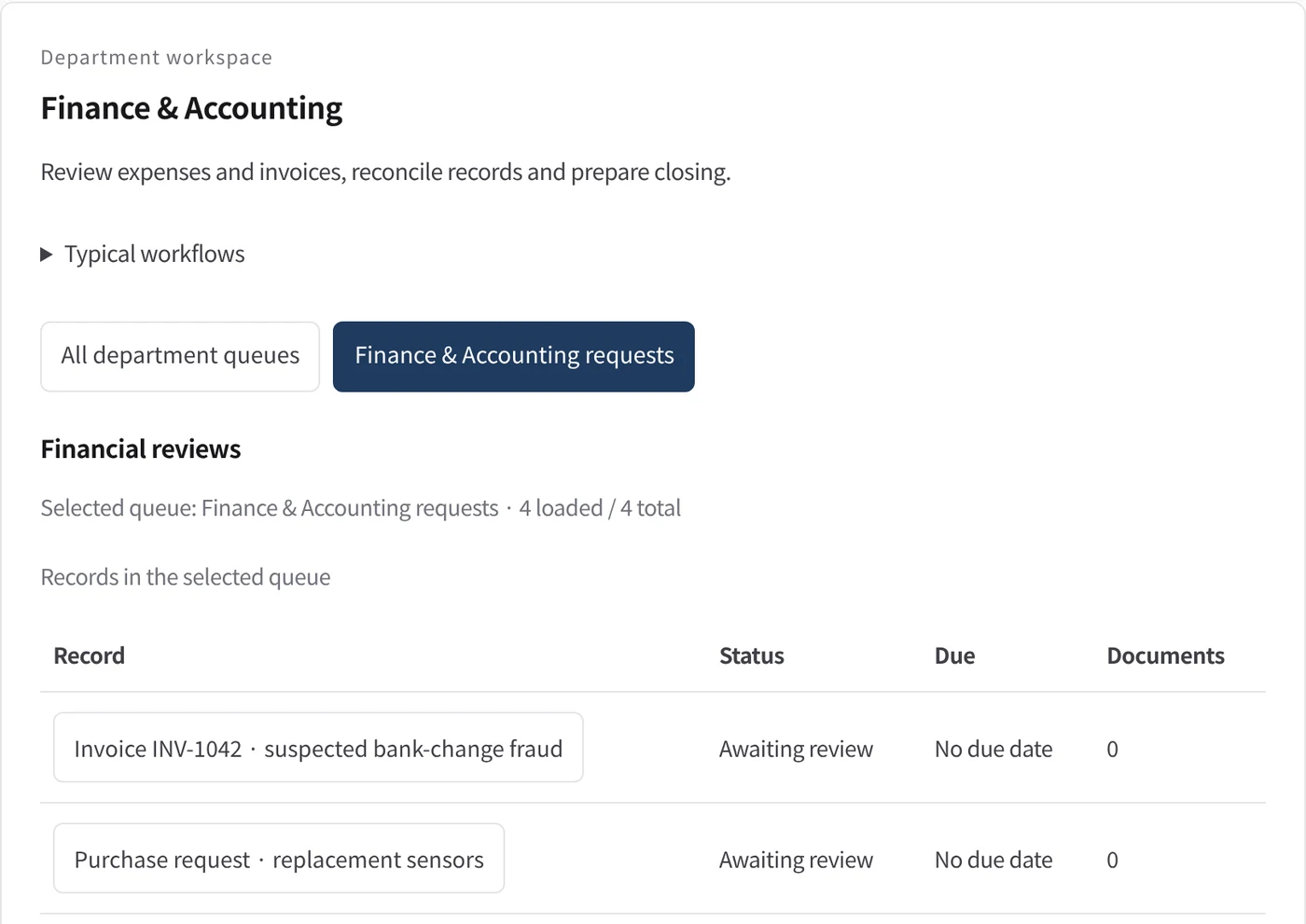
Department workspace: Financial reviews
Finance records are shown as a register with status, due date and number of attached documents.
- Inputs
- Work items in the project queues mapped to this department
- Kurahi prepares
- Read-only table of record, status, due date and documents
- Checks
- Records with a failed bank-change verification show 要確認 and payment on hold
Work queues
- Finance & accounting
- Expense claims
- Received invoices
- Spending approval (ringi)
Policy checks
- Required: employee id, amount, date, category, purpose
- Amount: second approver above 50,000 JPY; over 300,000 JPY not allowed here
- Expense date not in the future
- Receipt or invoice attached
- Qualified invoice items: registration number, tax amount, …
- Invoices above 1,000,000 JPY need a second approver
- Required: department, amount, purpose
- Do not state payment before approval
- Requester and description required
- Do not claim external actions were performed
- Document reviews require a source attachment
Approval routes
- Spending approval: manager → finance review (≥ JPY 100,000) → director (≥ JPY 1,000,000)
Autopilot routines
- Invoice intake from mail
Documents
- Expense/invoice review table
- Hand-off review worksheet
Connected systems
- freee 会計
- マネーフォワード クラウド請求書
- Microsoft 365
In every department
- Its own workspace, and an agent conversation that knows the department
- Incoming mail routed into the department's queue
- Approval routes with the required approvers and separation of duties
- Word, Excel and PowerPoint documents
- Signed evidence for every step
- A morning brief of decisions waiting and items escalated
Shared connectors
- kintone
- Gmail
- Box
- LINE WORKS
- Microsoft 365
Iniziate da un solo flusso di lavoro.
Raccontateci il lavoro che volete delegare. Vi mostreremo Kurahi sul vostro processo, poi vi aiuteremo a decidere fin dove spingerti.
Contattateci
Un confronto sul lavoro, sui sistemi coinvolti e su chi approva cosa. Una demo su un processo simile al vostro.
ContattateciRichiedete un preventivo
Per il personale digitale, la suite di data governance, l’installazione air-gapped e il supporto con SLA, tramite accordo scritto.
Richiedete un preventivoIniziate gratis
Installate Kurahi sul vostro server e usate le edizioni, la coda di lavoro e l’Autopilot ai livelli L0 e L1 senza costi.
Iniziate gratis