Kurahi Business · Anteprima
Il vostro back office in pilota automatico, con ogni approvazione registrata.
Kurahi Business trasforma il lavoro di back office in code di elementi di lavoro. Gli agenti preparano la pratica, il documento e la bozza di risposta; le vostre persone approvano, restituiscono o annullano con una motivazione scritta, e ogni passaggio viene registrato con evidenza firmata.
Cosa comporta l’adozione
Già incluso
- 15 aree di lavoro per reparto e code di lavoro
- Percorsi di approvazione 稟議 con delega ed escalation
- Ricezione delle e-mail con avvisi di frode, phishing e allegati
- Routine iniziali: smistamento della posta con bozze di risposta e ricezione delle fatture
- Documenti in Word, Excel e PowerPoint
Da configurare
- Le caselle e-mail e i sistemi da collegare
- Reparti, team e ruoli dal vostro provider di identità
- Percorsi di approvazione e soglie di importo
- Il livello di autonomia di ogni routine
Chi esegue l’implementazione
- L’amministratore IT installa Kurahi e collega l’accesso e i sistemi
- Un responsabile di business in ogni reparto definisce code, percorsi e soglie
- KODA SōKEN può eseguire l’implementazione insieme a voi, con un contratto Enterprise
Cosa imparano i dipendenti
- Esaminare una pratica già preparata e le sue fonti
- Approvare, restituire o annullare con una motivazione
- Gestire un’eccezione segnalata
Fuori perimetro
- Collegamenti a sistemi senza un connettore Kurahi
- Formati di documento e regole di business specifici della vostra azienda
- Flussi oltre le routine iniziali
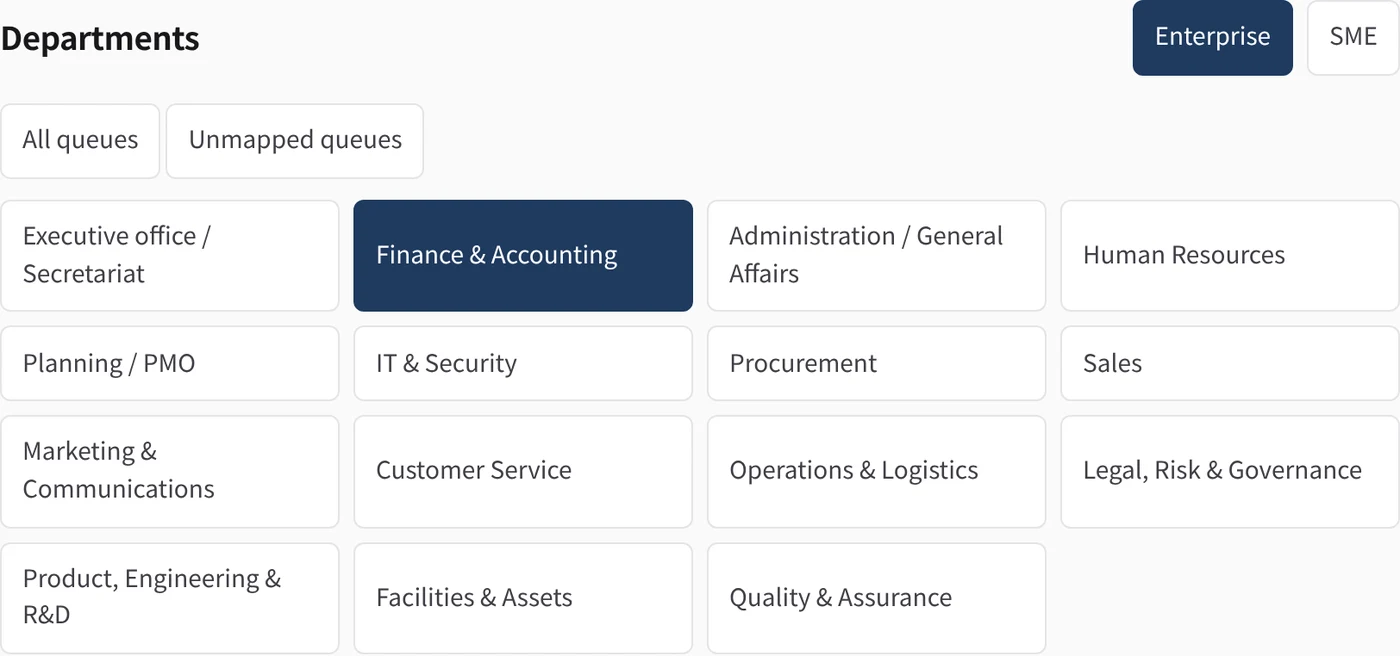
The 15 departments
For each department: what Kurahi does, and how many queues, checks, approval routes, routines and connected systems it brings. Open a department for the detail.
| Department | What Kurahi does | Functions | Queues | Checks | Routes | Routines | Connected |
|---|---|---|---|---|---|---|---|
| 01 Executive office / Secretariat | Inbox cases, reply drafts and documents · Morning brief · Inbox triage and reply drafts | 7 | 1 | 3 | 0 | 3 | Microsoft 365 |
| 02 Finance & Accounting | Expense claim review · Received invoice check · Calculation and rounding check | 12 | 4 | 11 | 1 | 1 | freee 会計, マネーフォワード クラウド請求書, Microsoft 365 |
| 03 Administration / General Affairs | General affairs request handling · Cost and lead-time checks · Facilities and equipment requests | 9 | 5 | 11 | 2 | 1 | Microsoft 365 |
| 04 Human Resources | Leave request check · Overtime check against limits · Overtime thresholds | 12 | 6 | 14 | 5 | 0 | SmartHR |
| 05 Planning / PMO | Workload snapshot · Metric definitions · Exception follow-up | 7 | 1 | 3 | 0 | 0 | — |
| 06 IT & Security | Equipment and IT device requests · Equipment approval route · Directory lookup (Microsoft Entra ID) | 6 | 2 | 7 | 1 | 0 | Microsoft Entra ID |
| 07 Procurement | Purchase request checks · Competitive quotes required · Supplier quote comparison | 10 | 2 | 8 | 0 | 1 | — |
| 08 Sales | Quotation from the price list · Invoice-system tax calculation · Unpriced items and provisional estimates | 11 | 2 | 10 | 1 | 1 | Microsoft 365, マネーフォワード クラウド請求書 |
| 09 Marketing & Communications | Marketing work queue · Department workspace: Campaign work | 2 | 1 | 3 | 0 | 0 | — |
| 10 Customer Service | Customer service work queue · Department workspace: Customer cases | 2 | 1 | 3 | 0 | 0 | — |
| 11 Operations & Logistics | Operations & logistics work queue · Department workspace: Delivery work | 2 | 1 | 3 | 0 | 0 | — |
| 12 Legal, Risk & Governance | Contract register · Contract review requests · Renewal and notice deadlines | 9 | 6 | 14 | 5 | 0 | — |
| 13 Product, Engineering & R&D | Product & development work queue · Department workspace: Development work | 2 | 1 | 3 | 0 | 0 | — |
| 14 Facilities & Assets | Room and facility requests · Facilities reviewer approval · Facilities work queue | 4 | 2 | 6 | 1 | 0 | — |
| 15 Quality & Assurance | Quality work queue · Department workspace: Corrective actions | 2 | 1 | 3 | 0 | 0 | — |
Functional packs (Project templates)
Ready-made templates with the queues, forms, checks, approval routes and guidance for one area of work. Create a Project from one and start working.
Company operations — all departments
One project with 15 departmental work queues for enterprise or SME operations. Agents prepare drafts and people review decisions. Configure access before adding confidential records.
business-company-operations
Contracts and obligations
Contract register, review requests, renewal and notice dates, obligations and human signature handoff.
business-contracts-obligations
Employee requests
Forms and reviewer routes for equipment, business cards, facilities and certificates. Mail intake prepares a triage item and acknowledgement draft.
business-employee-requests
Expense and invoice review
Take expense claims and received invoices in a queue; the agent matches receipts and invoices against the claim and drafts the review, and accounting approves.
business-finance-expense-invoice
General affairs requests
Take facilities, supplies, business cards and company-car requests in a queue; the agent drafts the reply or arrangement and a person approves it.
business-general-affairs
HR leave and overtime
Take leave and overtime requests in a queue; the agent checks them against the overtime limits and month-end forecast and drafts the confirmation, and a manager approves.
business-hr-leave-overtime
Management oversight
Prepare manual workload, exception and measured-outcome reports from authorized statistics and evidence. No automatic aggregation, distribution or downstream actions.
business-management-oversight
People operations
Leave/overtime review from supplied attendance sources and manual onboarding/offboarding checklists. No payroll or access changes.
business-people-operations
Purchase requests
Take purchase requests in a queue; the agent compares quotes and drafts the order proposal, and the budget holder approves. A person places the order after approval.
business-procurement
Sales quotations
Quotation requests by mail become cases with a 見積書 in Word and Excel. Prices come from the price list, tax and totals are computed by Kurahi, and a person sends the quotation.
business-sales-quotation
Percorsi di approvazione 稟議, nel modo in cui lavora la vostra azienda
稟議 (ringi) è il processo giapponese di approvazione per circolazione. Un percorso è un elenco ordinato di fasi. Ogni fase definisce gli approvatori per ruolo, per nome o per reparto, con un numero minimo di approvazioni, scadenze, delega ed escalation. Il percorso viene fissato sull’elemento al momento dell’invio, quindi le successive modifiche alla policy non alterano mai un elemento già in esame.
- Le persone approvano, restituiscono o annullano con una motivazione scritta, e vedono esattamente la bozza su cui stanno decidendo
- Escalation al ruolo successivo dopo una scadenza definita; delega quando la fase lo consente
- L’evidenza di ogni decisione è verificabile
Ricezione delle e-mail che sa quando fermarsi
Un messaggio diventa un elemento di lavoro per riferimento, mai copiandone il contenuto. Gli elementi a rischio vengono sottoposti a una persona, con il motivo.
Sospetta frode
Una proposta di modifica delle coordinate bancarie segnala l’elemento; non può essere approvato né completato finché una persona non sblocca l’avviso con una motivazione scritta.
Phishing e mittenti non verificati
Gli elementi segnalati non ricevono alcuna azione automatica. Attendono una persona.
Allegati dannosi
Gli allegati vengono messi in quarantena e verificati prima di qualsiasi scrittura. Un allegato rifiutato segnala il relativo messaggio.
Un elemento per messaggio
Un’esecuzione ripetuta non apre mai un secondo elemento né redige una seconda risposta per lo stesso messaggio.
Connettori per Microsoft 365 e SaaS giapponesi
Ogni connettore è disattivato e in sola lettura per impostazione predefinita. Ogni scrittura è un permesso separato, che attende l’approvazione di una persona, e i token restano nel vault dei segreti di Kurahi.
Documentazione dei connettori (in inglese)- Microsoft 365
- E-mail, calendario, file di OneDrive e SharePoint; risposte solo come bozza, con allegati
- Gmail
- Microsoft Entra ID
- Accesso, utenti e gruppi
- kintone
- Record delle app elencate, campi consentiti
- freee 会計
- Società, registrazioni, partner, conti contabili, ricevute
- マネーフォワード クラウド請求書
- Fatture, preventivi, partner
- SmartHR
- Dipendenti (solo dati di inquadramento) e reparti, in sola lettura
- LINE WORKS
- Canali e membri; messaggi di testo del bot come permesso approvato
- Box
- Ricerca, metadati e copia verificata nel Progetto
Documenti e il riepilogo del mattino
Word, Excel e PowerPoint
Gli agenti scrivono file Office, con grafici modificabili, nel Progetto. Una routine può allegare il documento alla bozza di risposta della stessa pratica.
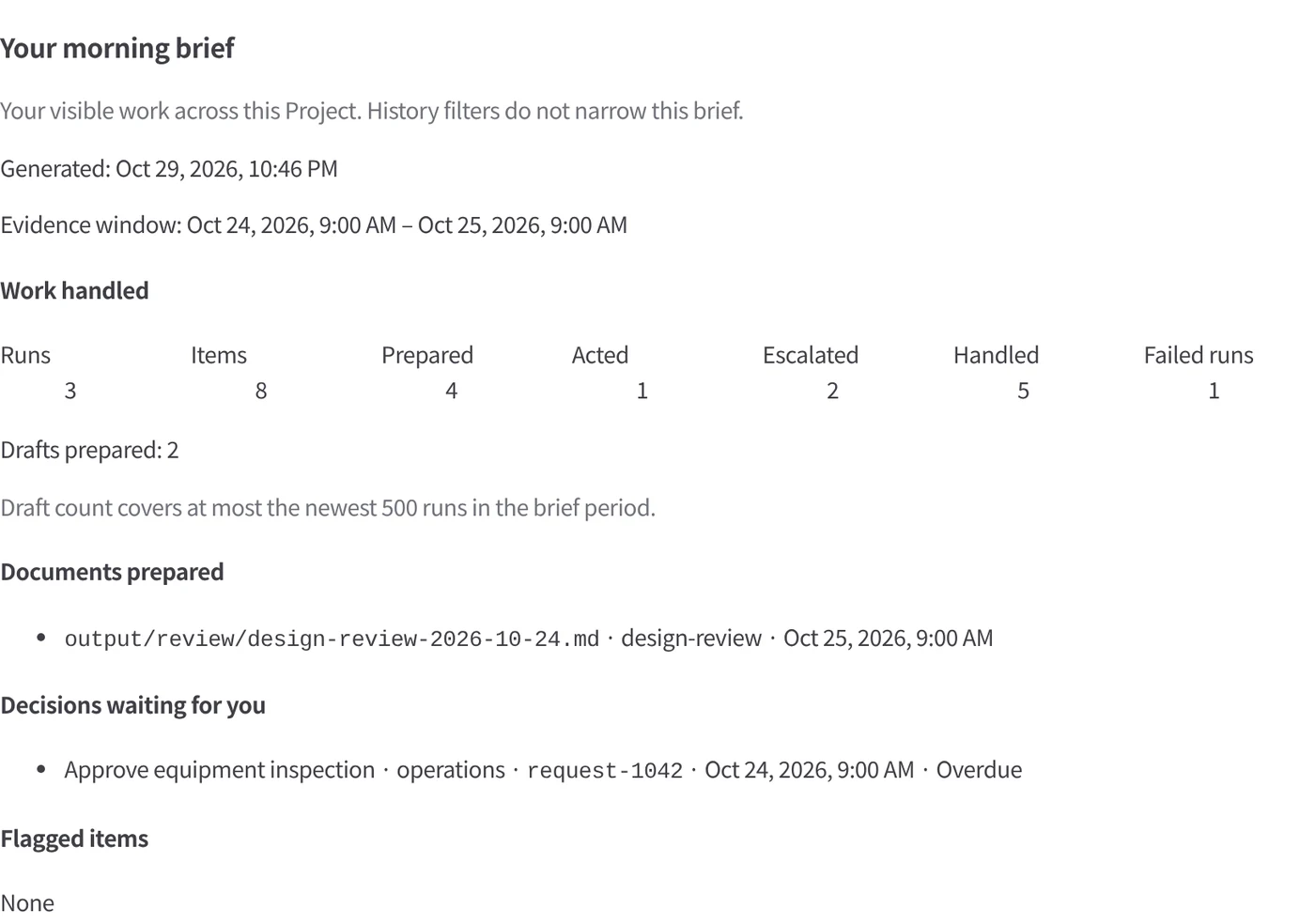
Un riepilogo del mattino per ogni persona
Cosa è stato gestito, quali documenti sono stati scritti e cosa vi sta aspettando: costruito solo a partire da dati registrati, senza alcun modello coinvolto.
Pilota automatico per il back office
Le routine smistano la posta in arrivo, ricevono le fatture e preparano le risposte al livello che definite voi. Pagamenti, coordinate bancarie, contratti, decisioni sulle persone ed elementi segnalati passano sempre a una persona.
How adoption works
Start small and expand on evidence. How much you hand over is always your decision.
- 01
Try it free
Install Kurahi on your own server and run one functional pack with sample data. There is no charge.
- 02
One department live
Start the first department at L0 (observe) or L1 (prepare). People make every decision; time per case and corrections are measured.
- 03
Expand
Extend to the next departments. Autonomy is raised only from 30 days of evidence and only when an authorised person approves it.
In the product
The back office, as your teams will see it
Real screens from the Kurahi Business console, shown with sample data.
Fifteen departments, one platform
Each department has its own workspace, queues and vocabulary, from Finance and Procurement to HR, Legal and Sales — on the same rules and evidence.
Every case in its queue
Invoices, purchase requests, expense claims and quotations arrive as cases with their status, due dates and documents.
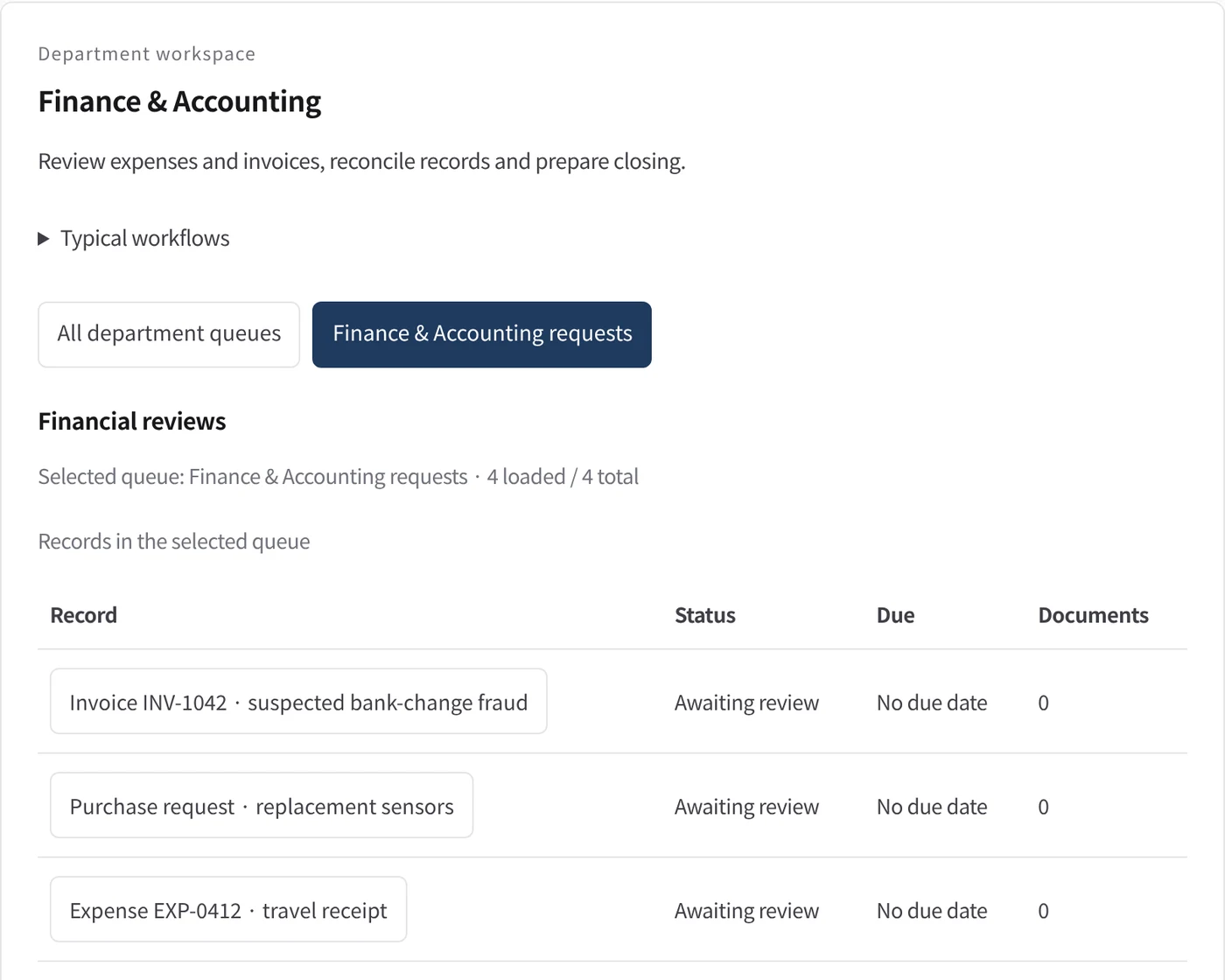
Policy checks that stop what must stop
A request to change bank details is flagged as suspected fraud and blocks approval until a person has verified it with the supplier.

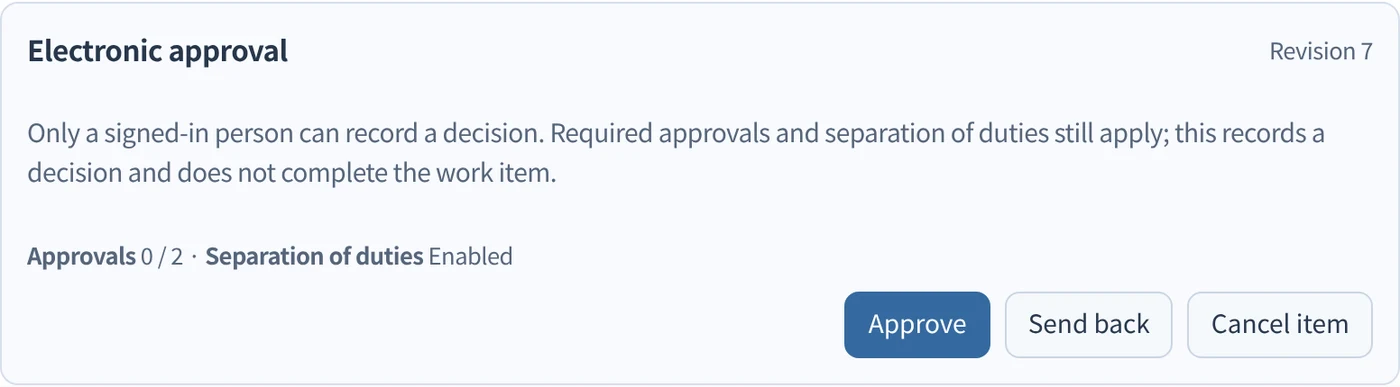
Decisions only people make
Approval routes with the required number of approvers and separation of duties; approve, send back or cancel, each recorded.
A morning brief of what happened
What Autopilot prepared overnight, what was escalated and which decisions wait for you — from the signed records, not from memory.
Iniziate da un solo flusso di lavoro.
Raccontateci il lavoro che volete delegare. Vi mostreremo Kurahi sul vostro processo, poi vi aiuteremo a decidere fin dove spingerti.
Contattateci
Un confronto sul lavoro, sui sistemi coinvolti e su chi approva cosa. Una demo su un processo simile al vostro.
ContattateciRichiedete un preventivo
Per il personale digitale, la suite di data governance, l’installazione air-gapped e il supporto con SLA, tramite accordo scritto.
Richiedete un preventivoIniziate gratis
Installate Kurahi sul vostro server e usate le edizioni, la coda di lavoro e l’Autopilot ai livelli L0 e L1 senza costi.
Iniziate gratis