Kurahi Business · Department 05 of 15
Planning / PMO
Management reports on workload, exceptions and measured outcomes are prepared from the queue figures you are allowed to see, with the source and time of every number kept. Reports are prepared by hand; nothing is collected or distributed automatically.
What Kurahi does in this department
Agents prepare; people decide. No agent sends, pays or deletes anything on its own.
Workload snapshot
A report template records current counts and overdue items with the source project, reader, filters and capture time of each figure.
- Inputs
- Authorized work-queue statistics copied by a person, with source project, reader, filters and capture time
- Kurahi prepares
- Snapshot worksheet: totals, status, queue and stage counts, overdue, approval timing, with evidence references
- Checks
- Unknown stays unknown, never zero; overlapping snapshots never added
- Autonomy
- No automatic collection; drafts only to output/; people correct and distribute
Metric definitions
Defines how queue and department figures are read, including median and 90th-percentile approval time, and that missing or denied data stays unknown rather than zero.
- Inputs
- workitems.stats: project ID; optional queue, department, windowDays (1–365, default 30)
- Kurahi prepares
- Definitions of total, byStatus, byQueue, stages, overdue, stageOverdue and timeToApprove (count, median, p90)
- Checks
- Scope all or visible is never company-wide; empty samples are null, not zero
Exception follow-up
Observed problems are listed per case with owner, next action and source reference.
- Inputs
- Case references, source project, reader, scope and capture time
- Kurahi prepares
- Table: case, workflow, problem, owner, next action, due, destination evidence, uncertainty, reviewer
- Checks
- Separates approval overrides, failed checks, overdue review and uncertain external results
- Autonomy
- Never retries or reverses an external action from the worksheet
Measured outcomes
A worksheet records baseline method, period and evidence, so outcomes stay unknown until independently supported.
- Inputs
- Baseline and current method, period and sample size; destination confirmations
- Kurahi prepares
- Evidence worksheet: outcome count and denominator, measured change, separately labelled savings estimate
- Autonomy
- No automated downstream verification or outcome calculation
Management review and decisions
Findings and decisions are tied to the report version with owner, deadline, required approvals and completion evidence.
- Inputs
- Report version, snapshot reference, exception and outcome worksheet versions, coverage gaps
- Kurahi prepares
- Decision record: pass, revise or unknown per check with reason and evidence; owners, due dates, next review
- Who approves
- A reviewer with authority for the review; people confirm audience and distribute
- Autonomy
- Creates no approvals, tasks, reminders, notifications or permissions
Planning & PMO work queue
Requests, cases and documents for this department are kept in one queue; the secretariat inbox routine files incoming mail here when the email belongs to planning & pmo.
- Inputs
- Requests, cases and documents; emails filed here by the secretariat inbox routine when they belong to this department
- Kurahi prepares
- Case with title, category, priority, flags, short summary and next step; reply draft for clean routine mail
- Checks
- Requester and description required; do not claim external actions were performed; document reviews require a source attachment
- Connected systems
- Microsoft 365 mail (read) and Outlook drafts (write.mailDraft); nothing sent
- Autonomy
- L1 準備 via secretariat-inbox-full; no sending, payments, bookings or account changes; flagged mail gets no reply
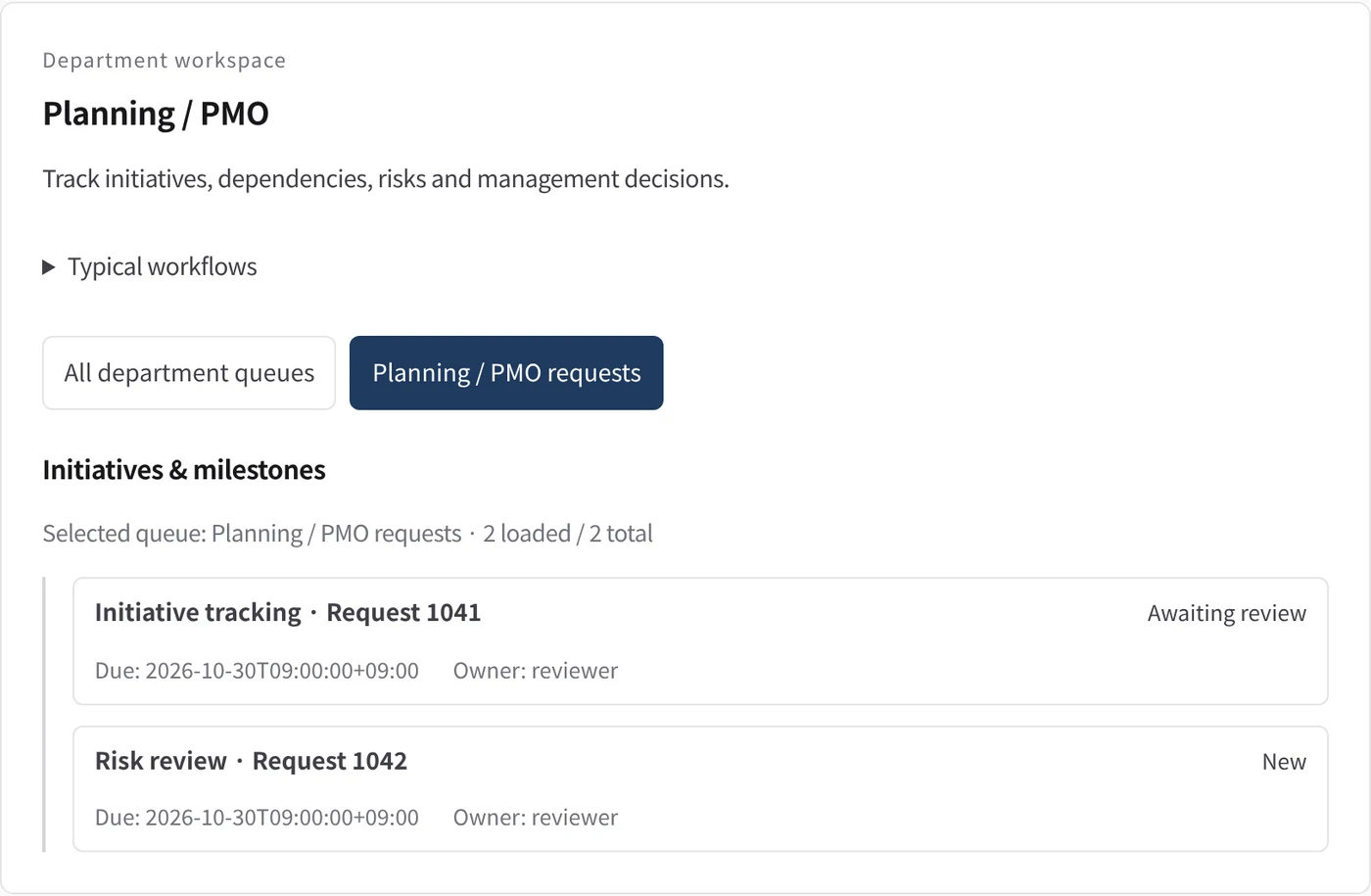
Department workspace: Initiatives & milestones
Planning work is listed with due date and owner.
- Inputs
- Work items in the project queues mapped to this department
- Kurahi prepares
- Read-only list of records with status, due date and owner (担当)
Work queues
- Planning & PMO
Policy checks
- Requester and description required
- Do not claim external actions were performed
- Document reviews require a source attachment
Documents
- Workload snapshot
- Exception follow-up
- Measured outcomes
- Management review and decisions
- Metric definitions
In every department
- Its own workspace, and an agent conversation that knows the department
- Incoming mail routed into the department's queue
- Approval routes with the required approvers and separation of duties
- Word, Excel and PowerPoint documents
- Signed evidence for every step
- A morning brief of decisions waiting and items escalated
Shared connectors
- kintone
- Gmail
- Box
- LINE WORKS
- Microsoft 365
Iniziate da un solo flusso di lavoro.
Raccontateci il lavoro che volete delegare. Vi mostreremo Kurahi sul vostro processo, poi vi aiuteremo a decidere fin dove spingerti.
Contattateci
Un confronto sul lavoro, sui sistemi coinvolti e su chi approva cosa. Una demo su un processo simile al vostro.
ContattateciRichiedete un preventivo
Per il personale digitale, la suite di data governance, l’installazione air-gapped e il supporto con SLA, tramite accordo scritto.
Richiedete un preventivoIniziate gratis
Installate Kurahi sul vostro server e usate le edizioni, la coda di lavoro e l’Autopilot ai livelli L0 e L1 senza costi.
Iniziate gratis