Kurahi Industrial
Comprendere i sistemi legacy prima di modificarli.
La modernizzazione inizia sapendo cosa fa il codice. Analizzatori deterministici producono i fatti, ogni fatto cita il file e la riga da cui proviene, e l’agente spiega quei fatti invece di indovinare.
Cosa comporta l’adozione
Già incluso
- Analizzatori per COBOL e JCL, PL/I, FORTRAN, Java, SQL DDL e codice PLC
- Rilevamento delle modifiche rispetto a una baseline salvata
- 設計書 in giapponese o in inglese, in Word, con ogni fatto che cita percorso:riga
- Una routine notturna che prepara le modifiche per la revisione
- Un server MCP per gli IDE
Da configurare
- Le cartelle del codice sorgente, in sola lettura, come Progetto
- La baseline per il confronto
- Chi revisiona i documenti e le modifiche
- L’orario della routine notturna
Chi esegue l’implementazione
- L’amministratore IT installa Kurahi e registra le cartelle del codice sorgente
- Un ingegnere capo sceglie la baseline e i revisori
- KODA SōKEN può eseguire l’implementazione insieme a voi, con un contratto Enterprise
Cosa imparano gli ingegneri
- Leggere un 設計書 verificando le citazioni percorso:riga
- Risolvere gli elementi contrassegnati come 要確認 (da confermare)
- Revisionare le modifiche rilevate come elementi di lavoro
Fuori perimetro
- Linguaggi e dialetti al di fuori dell’elenco supportato
- Framework interni e codice generato che richiedono regole aggiuntive
- Modelli di documento specifici della vostra azienda
Dal codice sorgente a un documento di progetto che potete revisionare
Cosa viene analizzato
- COBOL e JCL
- Programmi, copybook e step dei job
- PL/I
- Programmi e chiamate SQL incorporate
- FORTRAN
- Programmi e la loro struttura di chiamata
- Java
- Inclusi i mapping JPA confrontati con il DDL
- MyBatis
- XML di mapping collegato al Java che lo richiama
- Database SQL
- DDL e stored procedure (DB2 SQL PL, PL/SQL, package body) collegati ai chiamanti in Java, COBOL e PL/I
- PLC
- IEC 61131-3 Structured Text, e reti FBD e LD nelle esportazioni PLCopen XML. Solo il testo sorgente; non si collega mai a un controllore
Industrial capabilities in detail
Every capability of Kurahi Industrial: what is analysed, the agent tools, the 設計書, change detection and Autopilot.
Languages and formats analysed
| Capability | What it does |
|---|---|
| COBOL programs | Reads paragraphs, PERFORM/CALL graphs, file access, and EXEC SQL / EXEC CICS access, with path:line for every fact. |
| COBOL copybooks | Builds a field-level data dictionary from copybooks, including COPY resolution. |
| JCL jobs and procedures | Reads jobs, steps, EXEC PGM/PROC, DD statements and data sets, which are used for job flow and data set lineage. |
| Java (incl. Spring, JPA, MyBatis) | Reads classes, interfaces, enums, records, methods and fields; resolves inheritance and static calls; and finds table access from JPA, Spring Data, @Query, JDBC SQL literals and MyBatis mapper XML. |
| JPA mapping vs DDL comparison | Compares JPA join mappings with the foreign keys in the DDL and reports joins that have no foreign key, and foreign keys that no mapping uses. |
| SQL DDL | Reads CREATE TABLE/VIEW/INDEX, columns, keys, comments, ALTER and COMMENT ON (ANSI, DB2, Oracle, PostgreSQL basics). A table defined in more than one schema gets one node per schema. |
| SQL stored routines (DB2 SQL PL, Oracle PL/SQL) | Links procedures, functions, triggers and Oracle package members to the tables and routines they use. Dynamic SQL is listed as a gap. |
| FORTRAN (fixed form 77, free form 90+) | Reads program units, CALL/USE/INCLUDE, COMMON blocks with layout checks, EQUIVALENCE, and file I/O units bound through JCL. |
| PL/I | Reads procedures, CALL edges, %INCLUDE, DECLARE structures, files bound to JCL DD statements, EXEC SQL tables and ON-units. |
| PLC Structured Text (IEC 61131-3: .st .scl .iecst) | Reads PROGRAM, FUNCTION_BLOCK and FUNCTION units, VAR sections, an I/O map of %I/%Q/%M addresses, duplicate addresses, FB instances and writes. Works on source text only and never connects to a controller. |
| PLCopen XML (TC6 0201) | Reads the same facts at the XML line, including ST bodies and FBD/LD block calls and coil writes. IL/SFC bodies are reported as gaps. |
| Language detection and routing | Recognises files by extension or by content, and sends each content-detected file to exactly one engine. |
| Cross-language shared tables | Treats a table seen in COBOL EXEC SQL, PL/I, JPA @Table and CREATE TABLE as one node, so CRUD and impact work across languages. |
Agent tools (legacy_*, modernise_*)
| Capability | What it does |
|---|---|
| legacy_index | Parses COBOL, copybooks and JCL in a folder and builds a cached fact index with counts and diagnostics. |
| legacy_index_build (MCP only) | The editor server's version of the index build. |
| legacy_index_status (MCP only) | Reports whether a fresh index exists for a scope, with counts. It never parses. |
| legacy_query | Answers structural questions with file:line: summary, programs, paragraphs, callers, callees, call-graph, perform-graph, file-access, data-item, data-refs, job-steps, datasets, unresolved, graph-neighbours, call-chains, lineage. |
| legacy_rules | Lists business-rule candidates such as conditions, arithmetic with constants, ROUNDED, 88-level values and literals. It quotes the exact source text and does not infer meaning. |
| legacy_dictionary | Builds a copybook data dictionary: level, PIC, USAGE, bytes, offset, positions, OCCURS, REDEFINES, VALUE/88 and comment text. |
| legacy_impact | Shows what a change to a COBOL data item reaches (shared storage, data flow, copybook users, CALL USING, data sets, job steps), each with its linking fact. |
| legacy_design_doc | Generates a design document from the code. See section 3. |
| legacy_wave_plan | Proposes migration waves for human review. See section 4. |
| legacy_changes (agent tool only, not on MCP) | Compares the sources with a stored baseline. See section 4. |
| legacy_baseline_advance (agent tool only, not on MCP) | Moves the change-detection baseline forward to the snapshot that was last compared, or resets it from the current sources. |
| modernise_plan | Detects the languages in a folder, runs the active engines, and returns the combined inventory, shared tables with CRUD, coverage gaps, and the files that planned assistants would cover. |
| modernise_crud | Shows table CRUD across COBOL, PL/I, Java and JCL utilities, and file CRUD across COBOL, FORTRAN and PL/I, with path:line per operation. |
| modernise_impact | Shows the cross-language impact of changing a table, column, data set, FORTRAN COMMON block or module, Java class, or program. |
| modernise_inventory | Lists or details Java types, SQL tables and views, FORTRAN units and COMMON blocks, PL/I procedures, or PLC POUs and the I/O map (kind `plc`). |
Design document (設計書)
| Capability | What it does |
|---|---|
| Design document in Japanese or English | Writes a Markdown document from code in which every fact line cites path:line. Business purpose and rule meaning are left as marked placeholders for confirmation (要確認). |
| Sections | Includes the sections overview, jobs, programs, java, fortran, pli, plc, dictionary, tables, crud and coverage. A section is added only when the folder has that language. |
| Mermaid diagrams | Includes system overview and per-job flow diagrams generated from the graph. |
| PLC program specification | Includes the POU list, an I/O allocation table by %I/%Q/%M address, and the variables of each POU. |
| Java, FORTRAN, PL/I and table specifications | Adds Java class specs, FORTRAN units with a COMMON map, PL/I procedure specs, and table definitions when those sources are present. |
| Word (.docx) output | With `output_format: docx`, also writes `設計書_YYYYMMDD.docx` (English: `design-doc_YYYYMMDD.docx`) to the Project's `output/design-docs/` and never overwrites an existing file. |
Change detection, wave plan, impact
| Capability | What it does |
|---|---|
| Change detection against a baseline | Lists COBOL programs, copybooks, JCL jobs, and SQL tables, columns and routines that were added, removed or changed, plus CALL/PERFORM/EXEC SQL/step edges, with evidence and the impact of each changed program. The baseline is stored in `output/.legacy-index/baseline/`. |
| Migration wave plan | Proposes COBOL program waves from CALL and data-set dependencies, cycles (SCCs), coupling, size and complexity, and a documented risk score, in ja/en Markdown, for human review. |
| Knowledge graph and data lineage | Provides graph neighbours, call chains up or down, and data-set/table lineage through utility steps. |
| Coverage report | Lists constructs that were not modelled, unresolved calls, missing copybooks, skipped DDL and other gaps, so it is clear what was not analysed. |
Autopilot, workbench, packs and editor integration
| Capability | What it does |
|---|---|
| Industrial Autopilot routine nightly-legacy-analysis | Runs nightly at 01:30 JST and after a source drop. If the sources changed, it regenerates the Word 設計書, opens one work item with the changes, then advances the baseline. If nothing changed, it makes no model call. Level L1. |
| Industrial modernisation project template | A Project template in which source/, data/ and docs/ are read-only and output goes to output/ only. It includes rules, playbooks, a rule-table template, an assessment template, and queues (解析結果レビュー, 設計書レビュー, 移行計画, 品質・リスク). |
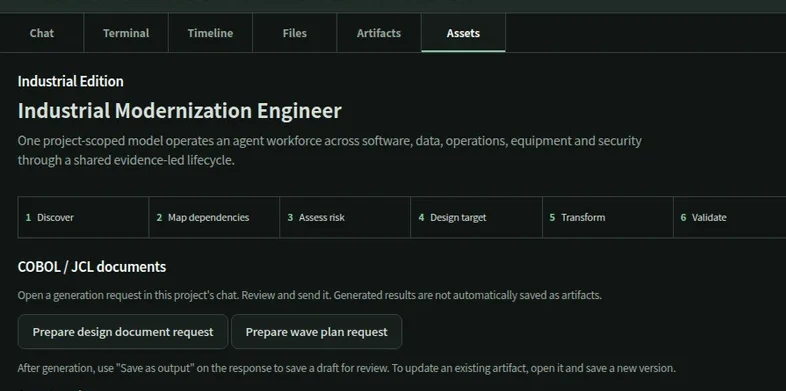
| Industrial workbench (Assets view) | Project screen with tabs (チャット, 端末, タイムライン, ファイル, 成果物, 資産), the modernisation lifecycle, and a domain grid that takes its status from the engine registry. |
| Design doc / wave plan request buttons | Opens a prepared chat request that runs `legacy_design_doc` or `legacy_wave_plan`, for review before sending. |
| Agent packs with readiness | Shows five Industrial packs with their readiness: Analysis (利用可能), Modernisation and Maintenance (設定確認が必要), Controls (オフライン環境の準備が必要), Cybersecurity (現在は利用できません); only Analysis is backed by an engine today. |
| Legacy MCP server for editors (kurahi legacy mcp) | A standalone MCP server over stdio or loopback HTTP for VS Code, Eclipse-based IDEs and other MCP clients. It is confined to one project root, caps response size, and keeps an append-only audit log. |
設計書, generato dal codice
Documenti di progetto (設計書) in giapponese o in inglese, scritti come file Word. Ogni riga di fatto cita percorso:riga, e ciò che il codice non può dire viene contrassegnato come da confermare (要確認), invece di essere indovinato.
Rilevamento delle modifiche rispetto a una baseline
Una baseline salvata permette all’analisi notturna di riportare solo ciò che è cambiato, con evidenza di file e riga. La baseline avanza solo dopo che la modifica è arrivata a una persona come elemento di lavoro.
Piano a ondate
Un ordine di migrazione proposto sulla base delle dipendenze e di una formula di rischio stampata, indicato come proposta che le persone devono esaminare e decidere.
Nell’editor dell’ingegnere
Il server MCP kurahi-legacy porta la stessa analisi in sola lettura in VS Code, negli IDE basati su Eclipse e in qualsiasi client MCP.
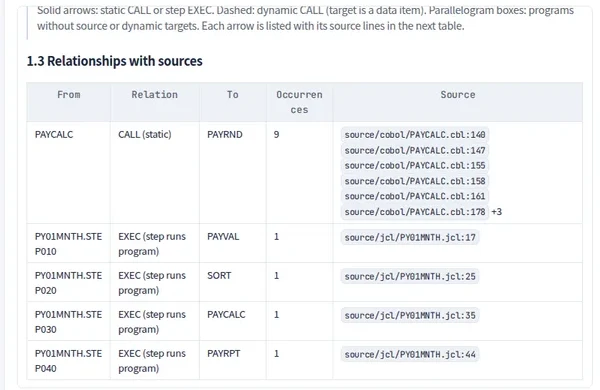
Un sistema paghe fittizio, letto dall’inizio alla fine
Quattro programmi COBOL, due copybook e un job JCL in quattro step di un’azienda fittizia. Non viene utilizzato alcun dato di un’organizzazione reale.
Pilota automatico per l’ingegneria, con limiti rigidi
Una routine notturna può analizzare il codice, rilevare le modifiche e preparare il 設計書. Non scrive mai su sistemi OT di produzione né su un PLC, e non esegue mai merge né deploy su un sistema del cliente. Aprire una pull request richiede il livello L3 e un’approvazione permanente che indichi il repository.
Iniziate da un solo flusso di lavoro.
Raccontateci il lavoro che volete delegare. Vi mostreremo Kurahi sul vostro processo, poi vi aiuteremo a decidere fin dove spingerti.
Contattateci
Un confronto sul lavoro, sui sistemi coinvolti e su chi approva cosa. Una demo su un processo simile al vostro.
ContattateciRichiedete un preventivo
Per il personale digitale, la suite di data governance, l’installazione air-gapped e il supporto con SLA, tramite accordo scritto.
Richiedete un preventivoIniziate gratis
Installate Kurahi sul vostro server e usate le edizioni, la coda di lavoro e l’Autopilot ai livelli L0 e L1 senza costi.
Iniziate gratis